

- ???
- Advanced Checkout Events
- Global-e and Marketing Pixels
Client Analytics
Base Global‑e Script
You can host the SDKJavaScript file locally or be served from the Global-e servers. If you would like to host the file on your servers, you can download the script from the following location by replacing the appropriate parameters:| Parameter | Description |
|---|---|
sDomain | Production: https://web.global-e.comIntegration: https://www.bglobale.comStaging: https://www2.bglobale.com |
window | The JavaScript window object |
document | The JavaScript document object |
clientJsURL | Local file path or direct to Global‑e servers/merchant/clientsdk/<merchantId>?v=<scriptVersion> |
ScriptVersion | The version of Global-e server API.Currently 2.1.4. |
merchantId | The current Merchant ID |
This list is subject to modifications and limitations that may affect the availability of payment methods on the checkout page.
Order Transaction Analytics
The Global‑e Checkout Analytics feature enables the Merchant to obtain and track customer activity and use this information for analytics. This feature is part of the Global‑e Client SDK. This document focuses on the implementation of the Global-e Client SDK Order Transaction Analytics event; it targets teams in charge of implementing analytics, trackers, and other front-end implementations related to checkout events. The Global‑e Client JavaScript SDK implements the front-end UX features, (for example, Country and Currency switching) and integration (analytics) features on your website. Merchants can use the Client SDK to gather data and integrate the checkout information with any analytics framework, such as Google Analytics, or with any pixel type or tracker solution. The following figure provides an overview of the Global‑e Client SDK subscription flow. The following figure provides an overview of the Global‑e Client SDK subscription flow.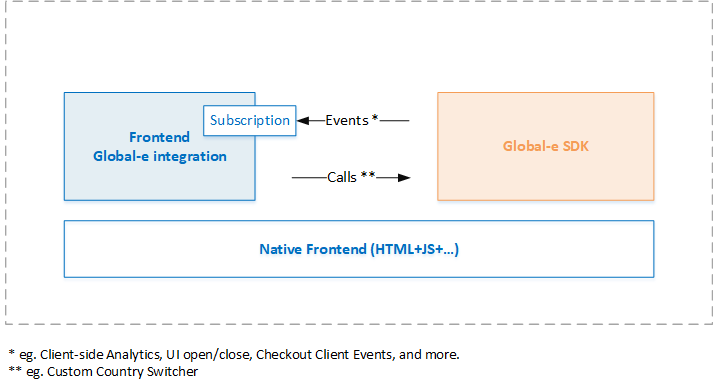
- The Merchant subscribes to the Global-e SDK Events (callback).
- When specific actions are performed by the customer on the Merchant’s website, the Global-e Client SDK sends a trigger, and the event returns the relevant information in JSON format.
OnCheckoutStepLoaded event functionality, as detailed in this document.
The following figure provides an overview of the Global‑e Checkout analytics flow.
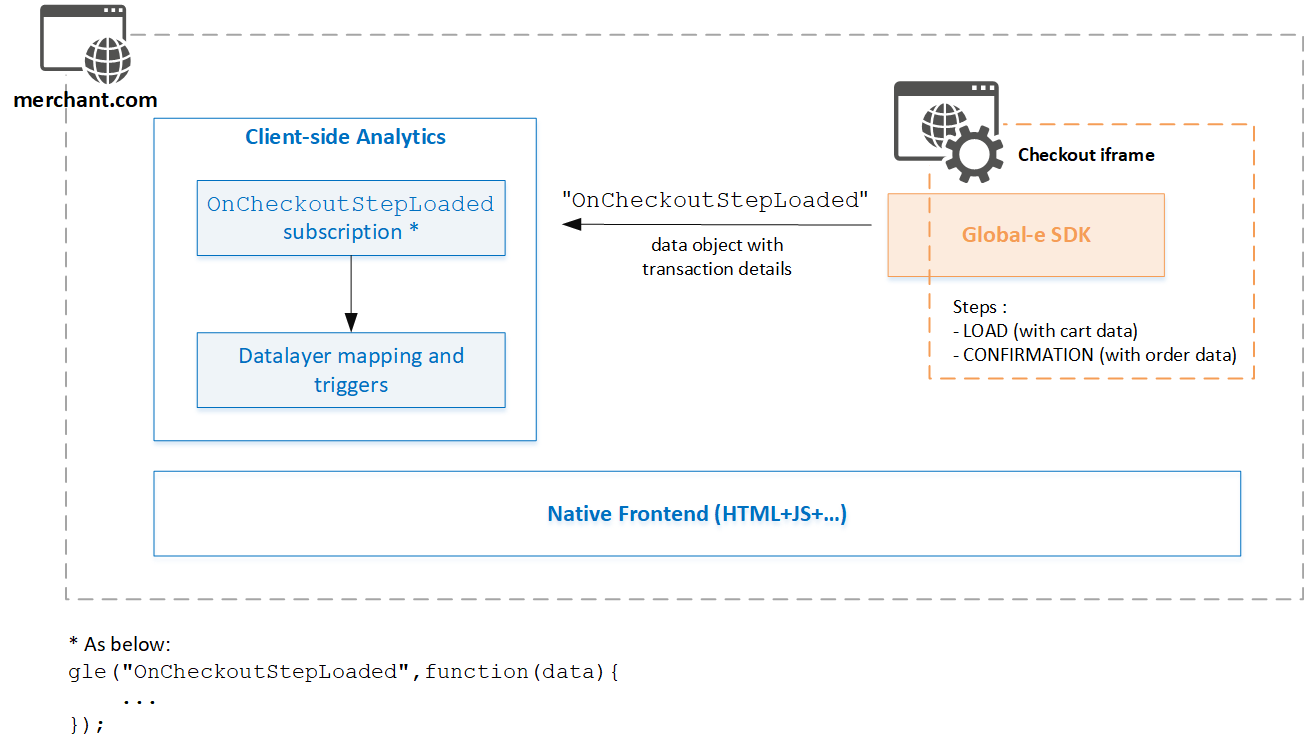
-
Subscribe to the Global‑e
OnCheckoutStepLoadedcallback, as described in Subscribing to OnCheckoutStepLoaded. -
After subscription, when the Global‑e
OnCheckoutStepLoadedis triggered based on checkout activities (LOADorCONFIRMATION), the Global‑e Checkout iFrame sends you back checkout and order information in JSON format. -
Map the checkout data returned by the
OnCheckoutStepLoadedto your existing analytics implementation so that you can create conversion reports in your analytics dashboard.Ad-blockers and payment redirects can affect analytics reporting.
- Global‑e shall provide and maintain the Global‑e Order Transaction object, as specified by Global‑e. In addition, Global‑e shall provide the support required to assist the Merchant with their implementation efforts.
- The Merchant shall implement the subscription, data layer mapping, and Quality Assurance testing.
OnCheckoutStepLoaded
This section describes how to subscribe to theOnCheckoutStepLoaded callback, the functionality of the callback and the Transaction Analytics object, and how to implement this feature for analytics.
OnCheckoutStepLoaded is triggered twice:
- Checkout Page****LOAD step: The LOADED step is called when the customer visits the checkout page or changes the destination country. Upon trigger, the Global‑e Client sends the OnCheckoutStepLoaded event together with a subset of the Order Transaction Analytics data, enabling the merchant to get product and cart information.
- Checkout CONFIRMATION****step: When the checkout completes (Checkout Confirmation), the Global-e Client sends the OnCheckoutStepLoaded event again, together with the Order Transaction Analytics data. The Order Transaction Analytics contains product, and payment information, as well as transaction information between the customer and Global-e and reconciliation transaction information between Global-e and the merchant.
-
You can use one of the following subscription options:
- If not already included, incorporate the
OnCheckoutStepLoadedsubscription snippet directly into your Checkout page (only). - Load the subscription from an external resource via tag manager (for example, Google Tag Manager).
- If not already included, incorporate the
- Implement your required triggers and data layer around the checkout process.
OnCheckoutStepLoaded callback is illustrated in the following snippet.
OnCheckoutStepLoaded Callback
This section describes theOnCheckoutStepLoaded callback, the data, and how the data is passed.
The OnCheckoutStepLoaded is called twice, once for the initial checkout page load and the second time for the checkout confirmation page.
OnCheckoutStepLoaded callback properties.
| Property | Description |
|---|---|
gle/glegem | The Global‑e SDK instance to subscribe to, gle or glegem, depending on the Platform. |
OnClientEvent | The name of the callback |
function(source, data){..} | Your implementation of the OnClientEvent callback function.The callback function is called twice, once when the checkout starts and once when the checkout ends. When the checkout starts, 'data.StepId' is set to 'data.Steps.LOADED'.The checkout load object is sent when the checkout page is loaded, that is, when 'data.StepId=LOADED'.When the checkout ends, 'data.StepId' is set to 'data.Steps.CONFIRMATION'.The transaction analytics object is sent when the checkout process is complete, that is, when ‘StepId = CONFIRMATION'. |
data | The data parameter contains the object that holds the event data. The data structure elements are detailed below. |
data
| Property | Type | Description |
|---|---|---|
Steps | object (enum) | Checkout step and confirmation stepValues: {{"LOADED":0,"CONFIRMATION":4} |
LOADED | Integer | The checkout page (step) has loaded.Global‑e checkout loaded code.See Data structure and examples. |
CONFIRMATION | Integer | The confirmation page (step) is displayed immediately after the payment has been authorised.Global‑e confirmation code.See Data structure and examples. |
StepId | Integer | The Global‑e stepId corresponding to the relevant step in the checkout:LOADED:0:``CONFIRMATION":4 |
details | Object | This field can contain: A checkout load object with cart information ( LOAD step).A Global‑e order transaction object ( CONFIRMATION step)The Global‑e Order Transaction Analytics Object contains all the order properties and ecommerce transactions, as detailed in the following sections. |
LOADED Step (StepId: 0)
When theLOADED step is triggered, the data property includes the following Checkout Load Object populated with cart data.
The information included in the Loaded Step is a subset of the Confirmation step. Therefore, fields related to the order have an empty value.
If the page is reloaded following a change of country, this object may also include Checkout information, such as customer billing and shipping details, as in the Transaction object (confirmation step).
- The Order Transaction Analytics Object section and subsections for a description of the properties.
- Checkout LOAD Step example.
CONFIRMATION Step (StepId: 4)
When theCONFIRMATION step is triggered, the data property contains the following JSON object:
| Property | Type | Description |
|---|---|---|
IsSuccess | Bool | If true, the payment (IsPayment) has been authorised.If the data returns success, the Client SDK sends the order with the order information and the URL of the order (window.location = "http://www.yourconfirmationpage.com") |
OrderID | String | The Global‑e Order ID.Example: GE103411992GB |
AuthCode | Integer | The Global‑e payment authorisation code. Example: 5 |
Order Transaction Analytics Object Overview
The"OnCheckoutStepLoaded data.details" parameter contains the Order Transaction Analytics Object with a breakdown of general ordering information and transactions.
Structure
The Order Transaction Analytics data object consists of a list of data properties set up as groups and components, generally structured as detailed below. Order Transaction Analytics Object Data StructureData Groups
The Order Transaction Analytics data groups consist of ecommerce transactions containing information such as order details, prices, and discounts, listed in merchant and customer currencies. Each time a customer places an order, there are two separate Global‑e transactions:- A transaction between Global‑e and the merchant
- A transaction between Global‑e and the customer
VAT does not apply to the US. The VAT value is 0 for all non-EU merchants.
- Merchant transaction: This group contains the prices and discounts in the merchant currency for the transaction between the merchant and Global‑e. It also includes the formulas for shipping cost estimations. These prices include VAT (between Global‑e and the merchant), if applicable. All values other than the shipping values, match the reconciliation reports.
- **Merchant transaction excluding local VAT:**This group contains all prices and discounts between the merchant and Global‑e. Prices are listed in the merchant’s currency, excluding the VAT between Global‑e and the merchant, if applicable.
- Customer transaction: This group contains all prices and discounts listed in the customer’s currency, reflecting the price paid and seen by the customer on the checkout page.
- Customer transaction in merchant currency: This group contains the price paid and seen by the customer on the checkout page converted to merchant currency. The conversion is based on the spot exchange rate.
Components
Object properties are grouped as components, as follows:- Order information: This component includes all order level details properties. See Order Prices and Transactions
- Product information: This component includes all product-level information that does not include prices. See Product Information
- Payment methods: This component lists the method used to make the payment, such as with a standard credit or debit card or with an alternative method (such as PayPal, for example). See Payment Methods
- Discounts: This component lists the discount values applied to the order (cart or product level), according to the original list of discounts received in the cart information for this order, and to the Merchant shipping configuration on Global‑e. See Discount Information
Data Details Properties
This section details the Transaction Object’s data, including order properties, product properties, order payment methods, and discount information.Order Properties
| Property | Type | Description |
|---|---|---|
OrderID | String | Global‑e order unique identifierExample: GE538738292GB |
ReplacementOrder | Bool | Indicates whether the order is a replacement. |
CustomerCurrencyCode | String | 3-char ISO currency code denoting the customer’s currency.Example: EUR |
MerchantCurrencyCode | String | 3-char ISO currency code denoting the original (merchant) currency on the merchant’s side.Example: GBP |
IsEU | Bool | Whether the destination country is in the EU. |
CustomerDetails | - | See CustomerDetails section. |
HubCountryCode | String | Two-letter country code of the hub from which the order is dispatched to the customer.Example: GB |
Region | String | Customer state or region (if available). |
SiteURL | String | Merchant website or store URL. |
DutiesGuaranteed | String | Indicates if the customer has selected the “guaranteed duties and taxes” option. |
ShippingMethodName | String | The name of the carrier, as was defined by Global-e for the specific merchant.Example: DHL, Spring Parcel Over 2Kg |
ShippingMethodType | String | The type of carrier, as selected by the customer on the checkout page.Example: Standard, Express |
DeliveryDaysRangeFrom | Decimal | The minimum number of days to delivery, as displayed on the Checkout page. |
DeliveryDaysRangeTo | Decimal | The maximum number of days to delivery, as displayed on the Checkout page. |
cultureCode | String | Culture code (language). If specified, the textual properties will be returned in the requested culture’s language if available. Texts in English will be returned by default |
InitialCheckoutCultureCode | String | Culture code determined during the initial checkout load |
CheckoutStep | String | The checkout step (LOAD or CONFIRMATION) |
CountryCode | String | Order destination country code 2-char ISO.Example: GB |
Customer Details
‘CustomerDetails’ is disabled by default. Make sure to request that Global‑e enables it.
MerchantUserId
| Property | Type | Description |
|---|---|---|
MerchantUserId | String | The registered user ID as it figures on the merchant’s websiteValue for guests: “null” |
ShippingAddress
| Property | Type | Description |
|---|---|---|
ShippingFirstName | String | The first name of the customer’s shipping address |
ShippingLastName | String | The last name of the customer’s shipping address |
ShippingAddress1 | String | The first line of the customer’s shipping address |
ShippingAddress2 | String | The second line of the customer’s shipping address |
ShippingCity | String | The customer’s shipping city |
ShippingCountryName | String | The customer’s shipping country name |
ShippingCountryCode | String | The customers shipping country code ISO-2 |
ShippingState | String | The customer’s shipping state name (if applicable) |
ShippingStateCode | String | The customer’s shipping state code ANSI (if applicable) |
ShippingCompany | String | The customer’s shipping company name |
ShippingZipCode | String | The customer’s shipping zip code |
ShippingPhoneNumber | String | The customer’s shipping phone number |
BillingAddress
| Property | Type | Description |
|---|---|---|
BillingFirstName | String | The first name of the customer’s billing address |
BillingLastName | String | The last name of the customer’s billing address |
BillingAddress1 | String | The first line of the customer’s billing address |
BillingAddress2 | String | The second line of the customer’s billing address |
BillingCity | String | The customer’s billing city |
BillingCountryName | String | The customer’s billing country name |
BillingCountryCode | String | The customer’s billing country code ISO-2 |
BillingState | String | The customer’s billing state name (if applicable) |
BillingStateCode | String | The customer’s billing state code ANSI (if applicable) |
BillingCompany | String | The customer’s billing company name |
BillingZipCode | String | The customer’s billing zip code |
BillingPhoneNumber | String | The customer’s billing phone number |
BillingEmail | String | The customer’s billing email address |
Order Prices and Transactions
This section details order-level Merchant and customer transaction properties.MerchantTransaction
This section details the order transactions between the merchant and Global-e. Global‑e reconciles with the merchant in the merchant transaction currency, as denoted in theMerchantCurrencyCode property.
| Property | Type | Description |
|---|---|---|
EstimatedTotalPrice | Decimal | Estimated total order price after deducting the shipping and duties discounts. |
TotalProductsPrice | Decimal | The total price of the products (only) before discounts |
TotalDiscountedProductsPrice | Decimal | The total price of the products after product discounts |
EstimatedShippingCost | Decimal | The estimated shipping cost to be subsidized by the merchant |
ShippingVATRate | Decimal | Shipping service fee VAT rate, if applicable |
DutiesAndTaxes | Decimal | Duties subsidy discount |
ProductTotalVAT | Decimal | The VAT paid by Global-e to the merchant on the products, if applicable. |
TotalVAT | Decimal | The total VAT sum to be paid by Global-e to the Merchant on the order, if applicable. |
RemoteAreaSurchargeFee | Decimal | Merchant Remote Area Surcharge SubsidyThis value is included in TotalShippingPrice.If this fee is not subsidised by merchants, this value is null.(RemoteAreaSurchargeFee=0). |
MerchantTransactionExcludingLocalVAT
This section details the order transactions between the merchant and Global-e excluding VAT. Global‑e reconciles with the merchant in the merchant transaction currency, as denoted in theMerchantCurrencyCode property.
| Property | Type | Description |
|---|---|---|
EstimatedTotalPriceExcludingVAT | Decimal | Estimated total order price after deducting the discounts |
TotalProductsPriceExcludingVAT | Decimal | Total products price before discounts (products only) |
TotalDiscountedProductsPriceExcludingVAT | Decimal | Total products price after discounts |
EstimatedShippingCostExcludingVAT | Decimal | The estimated shipping cost to be subsidised by the merchant |
CustomerShippingPriceExcludingVAT | Decimal | The shipping price paid by the customer |
DutiesAndTaxesExcludingVAT | Decimal | Duties subsidy discount taken by the Merchant |
RemoteAreaSurchargeFeeExcludingVAT | Decimal | Merchant Remote Area Surcharge SubsidyThis value is included in TotalShippingPrice.If this fee is not subsidised by merchants, this value is null (RemoteAreaSurchargeFee=0). |
CustomerTransaction
This section details the order transactions between the customer and Global-e in the currency used to place the order (the customer transaction currency), as denoted in theCustomerCurrencyCode property.
| Property | Type | Description |
|---|---|---|
CustomerTotalPrice | Decimal | The total price paid for the order by the customer |
CustomerTotalProductsPrice | Decimal | The total price paid by the customer for the products (only) |
CustomerTotalDiscountedProductPrice | Decimal | The total price of the products after deducting cart and product discounts paid by the customer |
CustomerShippingPrice | Decimal | The total shipping price after the discount is paid by the customer.The shipping price, including all shipping fees levied on the customer, such as the DangerousGoodsFee. |
CustomerDutiesAndTaxes | Decimal | The duties paid by the customer, including import duties, taxes, and customs clearance fees [CCF]). (Only relevant to international transactions outside the EU). |
CustomerTotalVAT | Decimal | The total VAT included in the products or shipping sum paid by the customer (EU to EU transactions), if applicable. |
CustomerShippingVATRate | Decimal | Shipping VAT rate, if applicable. |
CustomerUSSalesTax | Decimal | US sales tax paid by the customer (US customers only, as applicable) |
Fees
The following table lists the fees paid by the customer.| Property | Type | Description |
|---|---|---|
CustomerCCF | Decimal | Customs clearance fee, if not included in the shipping cost |
CustomerCODFee | Decimal | Cash on delivery fee |
CustomerDangerousGoodsFee | Decimal | Dangerous goods fee |
CustomerSizeOverchargeFee | Decimal | Size overcharge fee |
CustomerRemoteAreaSurchargeFee | Decimal | Remote area surcharge fee, if not subsidized by the merchant |
CustomerTransactionsInMerchantCurrency
This section details the order transactions between the customer and Global-e in the currency used to place the order (the customer transaction currency), as denoted in theCustomerCurrencyCode property.
Global‑e converts this amount to Merchant base currency, as denoted in the MerchantCurrencyCode property. Prices are converted by spot exchange rate.
| Property | Type | Description |
|---|---|---|
CustomerTotalPriceInMerchantCurrency | Decimal | The total price paid for the order by the customer |
CustomerTotalProductsPriceInMerchantCurrency | Decimal | The total price paid by the customer for the products (only) |
CustomerTotalDiscountedProductsPriceInMerchantCurrency | Decimal | The total price of the products after deducting cart and product discounts paid by the customer |
CustomerShippingPriceInMerchantCurrency | Decimal | The total shipping price, after discount, paid by the customerThe shipping price includes all shipping fees levied on the customer, such as CustomerRemoteAreaSurchargeFeeInMerchantCurrency. |
CustomerVATInMerchantCurrency | Decimal | The total VAT sum paid by the customer |
CustomerShippingVATRate | Decimal | Shipping VAT rate |
CustomerDutiesAndTaxesInMerchantCurrency | Decimal | The duties paid by the customer. This includes import duties, taxes, and customs clearance fees [CCF]). (Only relevant to international transactions outside the EU). |
CustomerUSSalesTaxInMerchantCurrency | Decimal | US sales tax paid by the customer in Merchant currency |
Fees
The following table details the fees paid by the customer converted to merchant currency.| Property | Type | Description |
|---|---|---|
CustomerCCFInMerchantCurrency | Decimal | Customer Custom Clearance Fee to be paid by the customer, if not included in the shipping cost |
CustomerCODFeeInMerchantCurrency | Decimal | Cash-on-Delivery fee to be paid by the customer |
CustomerDangerousGoodsFeeInMerchantCurrency | Decimal | Dangerous goods fee to be paid by the customer |
CustomerSizeOverchargeFeeInMerchantCurrency | Decimal | Size overcharge fee to be paid by the customer in the Merchant currency |
CustomerRemoteAreaSurchargeFeeInMerchantCurrency | Decimal | Remote area surcharge fee, if not subsidized by the Merchant |
Product Information
| Property | Type | Description |
|---|---|---|
ProductName | String | The name of the product2 Pack Regular Fit Checked Easy Iron Shirts |
ProductURL | String | URL of the product |
Categories | See Categories. | |
Brand | See Brand | |
SKU | String | Product SKU |
ProductGroupCode | String | Product Group Code |
SecondaryProductCode | String | Secondary Product Code |
Quantity | String | Quantity of units |
CartItemId | Type | Cart Item ID |
ProductCouponCodes | List of strings | Product coupon codeIf there are multiple coupons, the list of product coupon codes |
ParentCartItemID | String | Parent Cart Item ID for product bundles |
CartItemOptionId | String | Option Cart Item ID |
metadata | See Metadata |
Brand
The following table lists brand names and codes received from the cart information.| Property | Type | Description |
|---|---|---|
code | String | Product brand code |
name | String | Product brand name |
Categories
The list of all category names received.Product categories must be mapped on the Global‑e side or passed by default. Ask Global‑e to perform the mapping.
| Property | Type | Description |
|---|---|---|
code | String | Product category code |
name | String | Product category name |
Metadata
Metadata consists of product attributes that can vary for the same SKU; for example, customization such as engraving text.| Property | Type | Description |
|---|---|---|
AttributeKey | String | Attribute key |
AttributeValue | String | Attribute value |
Product Attributes
Attributes consist of information that does not vary for the same SKU; for example, the colour or size (in most cases), in a parent or child catalogue structure with variants.| Property | Type | Description |
|---|---|---|
AttributeCode | String | Attribute Code |
AttributeName | String | Attribute Name - Custom product attribute name that is used to describe the personalised product |
AttributeTypeCode | String | Attribute Type Code - Custom product attribute value used to describe the personalised product |
Product Prices
This section details the product prices, discounts, VAT (if applicable), and shipping cost estimations, for the transaction between the Merchant and Global-e in the Merchant base currency. All values except for the shipping values, match the base reports.| Property | Type | Description |
|---|---|---|
ListPrice | Decimal | Product list price (before any discounts).This property always denotes the product price in the default Merchant country, regardless of UseCountryVAT for the end customer’s current country.The list price is sent in the Cart API. |
SalePrice | Decimal | Product sale price, before applying any price modifications.This property always denotes the product price in the default merchant country, regardless of UseCountryVAT for the end customer’s current country. |
TotalPrice | Decimal | The total price of all units |
VATRate | Decimal | The VAT rate for the product, if applicable |
DiscountedPrice | Decimal | The price after discount |
| Property | Type | Description |
|---|---|---|
ListPriceExcludingVAT | Decimal | Product list price (before discounts), before applying any price modifications.This property always denotes the product price in the default Merchant country, regardless of UseCountryVAT for the end customer’s current country.The list price is sent in the Cart API. |
SalePriceExcludingVAT | Decimal | The price of the sale |
TotalPriceExcludingVAT | Decimal | Total price of all units |
DiscountedPriceExcludingVAT | Decimal | Discounted price |
| Property | Type | Description |
|---|---|---|
CustomerListPrice | Decimal | Product list price |
CustomerSalePrice | Decimal | Product selling price |
CustomerTotalPrice | Decimal | Total price of all units |
CustomerVATRate | Decimal | VAT rate (if applicable) |
CustomerDiscountedPrice | Decimal | The discounted price paid by the customer |
| Property | Type | Description |
|---|---|---|
CustomerListPriceInMerchantCurrency | Decimal | Product list price converted to merchant currency |
CustomerSalePriceInMerchantCurrency | Decimal | Product sale price as visible to the customer, after applying country coefficient, FX conversion, rounding rule (if applicable), and IncludeVAT handling. |
CustomerTotalPriceInMerchantCurrency | Decimal | Total price of all the units included in the order converted to merchant currency |
CustomerDiscountedPriceInMerchantCurrency | Decimal | The reduced price (after discounts) of the product in merchant currency. |
Payment Methods
The means with which the customer made the payment (credit card, PayPal, other). Global‑e recommends using the new and enhancedOrderPaymentMethods instead of the PaymentMethods listed below (maintained for backward compatibility).
| Property | Type | Description |
|---|---|---|
PaymentMethodName | String | The name of the payment methodExample:Standard method: credit card (Visa)Alternative method: PayPal |
PaymentMethodCode | String | Payment Method Code |
PaymentMethodTypeCode | Numeric | Payment Method Type ID associated with the payment method type:0 = Undefined1 = Credit Card2 = Local Alternative3 = Global Alternative4 = Coupon5 = Credit Card Instalments |
PaymentMethodTypeName | String | Payment Method Type Name:Undefined, Credit Card, Local Alternative, Global Alternative, Coupon, Credit Card Instalments |
Discount Information
General Discount Information
| Property | Type | Description |
|---|---|---|
Description | String | The discount description |
DiscountCode | String | The discount code |
DiscountTypeId | Integer long | The cart discount type. Discount related to the amount, coupon, or another promotion value. The Discount Type Option Values table describes one of the following possible values of DiscountTypeOptions enumeration denoting a type of discount. See Discounts - Discount Type Option Values. |
DiscountTypeName | String | Discount type name, such as shipping discount, cart discount, product discount, and more. |
CouponCode | String | The coupon code |
ProductCartItemId | String | Cart Item Id. The connection between the discount and product by cartItemId in product - this is null if the discount does not refer to a specific product but was cart level (distributed between products) |
Discount
| Property | Type | Description |
|---|---|---|
OriginalDiscountValue | Decimal | Discount value in the Merchant base currency including the local VAT, before applying any price modifications. This property always denotes the discount value in the default Merchant’s country, regardless of UseCountryVAT for the customer’s current country. |
VATRate | Decimal | The VAT rate applied to this discount (if applicable) |
LocalVATRate | Decimal (optional) | The VAT rate applied to this discount if the order is placed by the customer. This value must be specified if UseCountryVAT for the current Country is TRUE and therefore, the VATRate property actually denotes the VAT for the target country. |
DiscountValue | Decimal | Discount value as displayed to the customer, after applying country coefficient, FX conversion, and IncludeVAT handling |
Name | String | Discount name |
Description | String (optional) | Discount textual description |
CouponCode | String (optional) | Merchant’s coupon code used for this discount (applicable to coupon-based discounts only) |
ProductCartItemId | String (optional) | Identifier of the product cart item related to this discount on the Merchant’s site. This property may be optionally specified in the Cart API only so that the same value could be posted back when creating the order on the Merchant’s site with SendOrderToMerchant API. |
DiscountCode | String (optional) | Discount code used to identify the discount on the Merchant’s site. This property may be optionally specified in the Cart API only so that the same value could be posted back when creating the order on the Merchant’s site with SendOrderToMerchant API. |
LoyaltyVoucherCode | String (optional) | Code used on the Merchant’s site to identify the loyalty voucher on which this discount is based. |
DiscountType | Int64 | The DiscountType Option Value table describes one of the following possible values of DiscountTypeOptions enumeration denoting a type of discount. |
DiscountType Option Value
| DiscountType Value | Name | Description |
|---|---|---|
| 1 | Cart discount | Discount related to volume, amount, coupon, or another promotion value |
| 2 | Shipping discount | Discount aimed at subsidizing international shipping |
| 3 | Loyalty points discount | Discount applied against the Merchant’s loyalty points to be spent for this purchase |
| 4 | Duties discount | Discount aimed at sponsoring taxes & duties pre-paid by the customer in Global‑e checkout |
| 5 | Checkout loyalty points discount | Discount applied against the Merchant’s loyalty points in Global‑e checkout |
| 6 | Payment charge | Discount aimed at subsidizing the “Cash on Delivery” fee |
| Property | Type | Description |
|---|---|---|
Price | Decimal | Discount Value |
vatRate | Integer | The merchant Local VAT rate |
| Property | Type | Description |
|---|---|---|
PriceExcludingVAT | Decimal | Discount Value |
| Property | Type | Description |
|---|---|---|
CustomerPrice | Decimal | Discount Value |
CustomerVATRate | Integer | VAT Amount |
Customer Transactions in Merchant Currency
| Property | Type | Description |
|---|---|---|
customerPriceInMerchantCurrency | Decimal | The price of the customer discount in customer currency |
customerVATRate | Integer | VAT amount |
OrderPaymentMethods
OrderPaymentMethods provide comprehensive information about the payment methods used by the customer to pay for the order; it includes a breakdown of the amount paid as well as a gift card indication, when applicable.
| Method | Type | Description |
|---|---|---|
OrderPaymentMethods | Array | A list of payment methods used to place the order. |
| Property | Type | Description |
|---|---|---|
PaymentMethodId | Integer | The ID of the payment method in the Global‑e system. |
PaymentMethodName | String | The name of the payment method. |
IsGiftCard | Boolean | Used by the merchant to identify the gift card payment method. |
GiftCardFields | String | Key-values pairs from the gift card merchant app setting (in the Global‑e system).Null for regular payments (without gift cards).GiftCardFields can be used to retrieve the gift card identifier. |
PaidAmountInCustomertCurrency | Decimal | The amount paid in customer currency. |
PaidIAmountnMerchantCurrency | Decimal | The amount paid in merchant currency, using spot conversion. |
PaymentMethodTypeCode | Numeric | Payment Method Type ID associated with the payment method type:0 = Undefined1 = Credit Card2 = Local Alternative3 = Global Alternative4 = Coupon5 = Credit Card Instalments |
PaymentMethodTypeName | String | Payment Method Type Name:Undefined, Credit Card, Local Alternative, Global Alternative, Coupon, Credit Card Instalments |
Global‑e Properties
| Property | Type | Description |
|---|---|---|
URL | String | URL (Store URL) |
CustomURL | String | Technical field for Global‑e use; to be disregarded in the merchant implementation. |
MerchantId | String | Merchant ID, as registered in the Global‑e system |
Title | String | The title of the transaction |
HostName | String | The name of the server hosting merchant website |
CustomHostName | String | Technical field for Global‑e use; to be disregarded in the merchant implementation. |
PageType | Number | Technical field for Global‑e use; to be disregarded in the merchant implementation. |
CartToken | String | Cart token for the cart generated on the Global‑e side by the Cart API method preceding the current cart action. This property is mandatory only for server-side calls. |
UrlReferer | String | The URL of the previous web page from which a link was followed. |
DoLog | Boolean | Receives and logs plain messages and sends them to other logging methods. |
Properties Distribution per Transaction
The following table provides the distribution of properties for each transaction. ORDER Properties Distribution| Property | Merchant Transactions | Merchant Transactions Excluding Local VAT | Customer Transactions | Customer Transactions in Merchant Currency |
|---|---|---|---|---|
EstimatedTotalPrice | ✓ | ✓ | ✓ | ✓ |
TotalProductsPrice | ✓ | ✓ | ✓ | ✓ |
TotalDiscountedProductsPrice | ✓ | ✓ | ✓ | ✓ |
EstimatedShippingCost | ✓ | ✓ | ✗ | ✗ |
CustomerShippingPrice | ✗ | ✓ | ✓ | ✓ |
ShippingVATRate | ✓ | ✗ | ✓ | ✓ |
DutiesAndTaxes | ✓ | ✓ | ✓ | ✓ |
TotalVAT | ✓ | ✗ | ✓ | ✓ |
RemoteAreaSurchargeFee | ✓ | ✓ | ✓ | ✓ |
CCF | ✗ | ✗ | ✓ | ✓ |
CODFee | ✗ | ✗ | ✓ | ✓ |
DangerousGoodsFee | ✗ | ✗ | ✓ | ✓ |
SizeOverchargeFee | ✗ | ✗ | ✓ | ✓ |
| Property | Merchant Transactions | Merchant Transactions Excluding Local VAT | Customer Transactions | Customer Transactions in Merchant Currency |
|---|---|---|---|---|
ListPrice | ✓ | ✓ | ✓ | ✓ |
SalePrice | ✓ | ✓ | ✓ | ✓ |
DiscountedPrice | ✓ | ✓ | ✓ | ✓ |
TotalPrice | ✓ | ✓ | ✓ | ✓ |
Markdown | ✓ | ✓ | ✓ | ✓ |
| Property | Merchant Transactions | Merchant Transactions Excluding Local VAT | Customer Transactions | Customer Transactions in Merchant Currency |
|---|---|---|---|---|
Price | ✓ | ✓ | ✓ | ✓ |
VATRate | ✓ | ✗ | ✓ | ✓ |
Examples
This section provides implementation examples.Checkout LOAD Step
Key points:- The Checkout Load step is called when the customer visits the checkout page and when switching the country.
- The information included in the Checkout Load Step is a subset of the Confirmation step.
Analytics Implementation and Mapping to Analytics
This section details some basic methods you can use to include the Global-e analytics subscription in your code. Load the following as a dedicated logic directly in DOM as JavaScript content: subscription, complete data layer mapping, and event execution. Example: Frontend DOMGB Orders
GB Order Sent to the US with Sales Tax and Duties and Taxes Paid Separately at Checkout (Optional DDP)
Key points :- The VAT is applied on the Merchant transaction between Global-e and the brand.
- Duties paid as part of the product price are featured as such and described under a subsidy discount object.
- The applicable US sales tax is featured in a dedicated field.
GB Order Sent to Australia with Duties and Taxes Included in the Product Price (Hidden Force DDP)
Key points:- The VAT is applied on the Merchant transaction between Global-e and the brand.
- Duties & taxes paid as part of product price are featured as such and described under a subsidy discount object.
US Orders
US Order Sent to the EU with Duties and Taxes Included in the Product Prices (as Hidden Force DDP)
Key points:- There is no local tax that is applicable to the transaction between Global-e and the brand.
- Duties & taxes paid as part of product price are featured as such and described under a subsidy discount object.
- There is no VAT applicable to the customer or the brand (local taxes are handled under Duties & Taxes)
US Order Sent to any Country as Optional DDP
Key points:- There is no local tax that is applicable to the transaction between Global-e and the brand.
- Duties & taxes paid separately by the customer on the checkout page are featured as a transaction amount for the customer transaction but not between Global‑e and the brand.
- There is no VAT applicable to the customer or the brand (local taxes are handled under Duties & Taxes).
EU Order with Customer VAT and Merchant VAT
Key points:- Merchant and Customer VAT rates can differ if they are applied: between Global‑e and the brand - or - between Global‑e and the customer (EU distance selling VAT rules)
- As a result, VAT-inclusive product prices also differ.
- No duties applicable
Global‑e and Marketing Pixels
With the Global-e solution installed, your store has now two types of checkouts, the standard checkout for your local customers and the Global-e checkout for your international customers.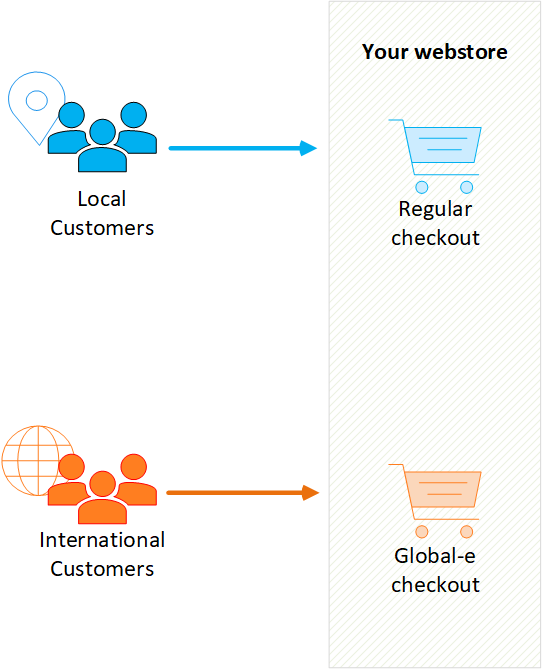
Adding Pixels to the Global‑e Checkout
Global‑e provides a JavaScript callback function (“OnCheckoutStepLoaded”) that holds the checkout and order information in a data object. You can use this callback to trigger events both when the Global‑e checkout is loaded or complete.
To embed pixels in the Global-e checkout:
- Edit the OnCheckoutStepLoaded callback function by adding the relevant pixel snippets to the callback function.1. Edit the OnCheckoutStepLoaded Callback Function
- Place the final OnCheckoutStepLoaded callback function on your site.2. Place the Final OnCheckoutStepLoad Callback on your Site
-
Edit the OnCheckoutStepLoaded Callback Function
The following code snippet presents the subscription to the
OnCheckoutStepLoadedcallback function. Note that this code currently does not contain any pixels. data.Steps.LOADED****loaded, while the data.Steps.CONFIRMATION case is executed when the Global‑e checkout has been completed.We recommend deferring the Global-e scripts until after the entire document has been parsed. Hopefully, this will allow any analytics code to load onto the page before the Global-e analytics scripts load. If the above recommendations do not improve the situation, we recommend you add your analytics code to the source of the checkout page, assuming there are no reasons preventing that from happening. Converted price analytics You may need to capture converted prices in analytics that run on your product page and other pages before checkout. To do this, there is an event that triggers after the prices on the page are converted. You can subscribe to this event, and after it triggers, you can execute your analytics, so you are able to retrieve the converted prices.As mentioned, the callback returns a data object in JSON format that contains information about the checkout, such as item prices and quantities, order total, and currency. Use the variables in the JSON data object to configure your pixel. See Data Object Confirmation Step (JSON) for an example. Use the relevant data object variables to add pixels to the LOADED step, the CONFIRMATION step, or both. The following examples show how this is edited or amended for each marketing platform.Platform Event Example Google Tag Manager (Data Layer) PurchaseEventGoogle Tag Manager (Purchase Data Layer) Google Ads (gtag) ConversionEventgtag - Conversion Event TikTok PlaceAnOrderEventTikTok - PlaceAnOrDer Event -
Place the Final OnCheckoutStepLoad Callback on your Site
To implement the final OnCheckoutStepLoad callback on your site:
OnCheckoutStepLoadedonline store, in theheadelement. Note that the callback function is only initiated when the Global‑e checkout is loaded or complete, even though the function is implemented on every page of your site.
Common Data Object Variables
The following table lists the most common data object variables used in marketing platforms events:| Variable Definition | Variable JSON Path |
|---|---|
| Global‑e Order Id | data.details.OrderID |
| The merchant currency: The Store currency | data.details.MerchantCurrencyCode |
| Order products total (in merchant currency) | data.details.OrderPrices.MerchantTransaction.TotalProductsPrice |
| Single product sale price (in base Store currency) | data.details.ProductInformation[i].ProductPrices.MerchantTransaction.SalePrice |
| Single product quantity | data.details.ProductInformation[i].Quantity |
| Single product SKU | data.details.ProductInformation[i].SKU |