

Overview
Global‑e’s API Integration Guides provide detailed documentation to help developers smoothly integrate Global‑e APIs into their systems. Typically, these guides cover authentication methods, API endpoints, request methods and response formats, parameters, examples, and best practices.Global-e Environments
Consult your Global-e project team to determine the appropriate environments for your integration.
| Environment | URL Endpoint |
|---|---|
| INT (Integration) | https://connect.bglobale.com/ |
| STG (Staging) | https://connect2.bglobale.com/ |
| PROD (Production) | https://api.global-e.com/ |
Authentication
When initiating calls to the Global-e APIs, ensure that each API request is authenticated using the appropriate authentication method supported by Global-e, as documented in this section.Authentication: MerchantGUID
To implement API calls with Global-e the only required information is themerchantGUID provided by Global-e.
For authentication, make sure to include your Merchant GUID as part of each call or as part of the header so that Global-e can verify your identity. Make sure to use the appropriate merchantGUID, depending on the Global‑e integration environment used for development or production purposes. See Global-e Environments.
MerchantGUID in URL
Add your MerchantGUID as part of each API URL.
MerchantGUID as part of the header
Add your MerchantGUID as part of the header as illustrated below.
Dispatch Notifications via API
This section describes the manifest shipping requirements sent by Merchants to Global-e via API. The Manifest allows the timely and correct processing of parcels in the Global‑e hub or in the Merchant’s warehouse. This procedure is required for:- Merchants sending multi-parcel orders.
- Merchants wishing to fulfill backordered items.
- Create relevant Airway bills (AWB) and export documentation for all parcels when the parcels are processed at the Global-e hub.
-
Amend out-of-stock items automatically:
- The customer is notified in advance that some of the items are out of stock.
- The customer is refunded or authorization amounts are amended.
- The export paperwork is updated to reflect the correct items and quantities for duties and taxes calculations, ensuring timely release from customs in the destination country.
-
Shipping via the Global‑e hub: Know in advance how many parcels are on the way and their unique identifier codes so that these can be scanned and processed on arrival.
As part of its cross-border enablement, Global‑e provides the following shipping-related features:The manifest is recommended but not required when:
- Shipping a single parcel order and you do not require backorder (pre-order) items support. When implementing the manifest, the order is automatically amended for out-of-stock items.
- Shipping multi-parcel orders from your warehouse and all parcels are shipped the same day (order fulfilment is not split over a period of few days). When implementing the manifest, the order is automatically amended for out-of-stock items and the airway bills (AWB) and export paperwork are automatically generated.
- Duties & Taxes calculation
- Commercial Invoice generation (or paperless trading when relevant)
- Carrier label
- Automated international refunds
- Order split shipment
- Customer dispatch notification and tracking information
- Multiple parcels order declaration
- Order items line cancellation (for example, Out of stock)
- Partial delayed shipments (for example, restocking items)
| ExceptionType | Name | Description |
|---|---|---|
| 1 | Out-of-Stock | Out of stock, will not be fulfilled. |
| 2 | Backorder Pre-order Customized Item | Backorder/preorder/customizeditem/to be restocked will be fulfilled. |
| 3 | Cancelled by request | The customer requested to remove this product. Will not be fulfilled |
The manifest process (and related API) is designed to support notifications of parcel preparation/dispatch. Calls should always be made upon dispatching a product and never be used to notify only exceptions.The only edge case with using only an exception in a call is to notify no further expected items will be dispatched thus requiring to close the order with “Out of stock” and “order complete” where all remaining items would be refunded.
Prerequisites
The Merchant OMS or WhMS should have knowledge of the following information and allow, either directly or through an escalation process, to:- Have the full list of items in the order
- Enable selection of items to be dispatched
- if applicable, enable the cancellation of line items
- if applicable, enable the declaration of items as back-ordered
Integration General Specification
The following samples are descriptive of typical use cases. For the full extent of the respective call specifications mentioned below, and optional attributes visibility, see the Global‑e API document.API Call
Method/URL| Attribures | Descritption |
|---|---|
| OrderIdOR (only 1 required)MerchantOrderId | Global‑e Order ID (starting with “GE”)ORMerchant order Id as recorded in own ecommerce platform |
| DeliveryReferenceNumber | (optional) Additional informative dispatch reference |
| IsCompleted(can be optional) | Once True, all items not already declared as part of a parcel will be cancelled and refundedUntil True consolidation of parcels is expected if no backordersIf orders have backorders exception specified: not required to allow for dispatch of existing parcels without delay |
| ParcelCode(MAX 20 characters) | Merchant unique identifier for each parcel(/box) to be shipped Can be freely generated in any range as long as unique |
| ProductCodeOR (only 1 required)CartItemId | Product Code/SKUORCart Item/Line Identifier*(should match cart information fields exchanged at checkout time)* |
| ExceptionType(With optional quantity) | 1 for explicit item line cancellation (implicit if IsCompleted to “true” and some items were not assigned to a parcel 2 for backordering (differed shipping) |
| ExpectedFulfilmentDate(Optional) | (Optional) Tentative target for fulfilment of backordered items (in YYYY-MM-DD format) |
| TrackingDetails(see WYOL use case ) | In case the AWB has been generated through other means (WYOL), tracking information can be pushed here |
API Response
The API triggers an asynchronous process, only the first-level JSON body structure will be checked upon receiving a call to trigger a success or failure response. Hence expected results must not be presumed on Success response depending on body sub-attributes processed asynchronously.
Success Response
ResponseInfo : (Reason is optional)
Failure Response
General API error as ErrorInfo :Use Cases
Examples of request body asUpdateOrderDispatchRequest
Considerations regarding examples for simplicity:
- Using
MerchantOrderIDrather than GE OrderId - Using
ProductCoderather thanCartItemId
Single Parcel Shipping
Order description for this section :- Product-A in quantity 1
- Product-B in quantity 2
No Exceptions
Explicit Partial Cancellation
Cancellation of 1 product-B Single CallImplicit Partial Cancellation
Cancellation of 1 product-B Single callMulti Parcel (No Splitting / Partial Shipping)
Order description for this section :- product-A in quantity 1
- product-B in quantity 2
No Exceptions
Single callPartial Dispatches and Calls with Consolidation Request
Dispatch of 1 product-B at a later date but to be consolidated with other parcels before shipping any.The 1st call flags the order as incomplete but no “backorder” is specified.
Split parcel supporting pre-orders and backorders
Order description for this section :- product-A in quantity 1
- product-B in quantity 2
- product-C in quantity 1
Explicit Backordering and Explicit Cancellation
Cancellation of 1 product-C Backordering of 1 product-A First call (“day 1”)Implicit Partial Cancellation (split)
Cancellation of 1 product-C Backordering of 1 product-A First call (“day 1”)Multiple Partial Dispatches with Explicit Cancellation (Consolidated)
Cancellation of 1 product-B Backordering of 1 product-A Backordering of 1 product-C First call (“day 1”)Partial Dispatch Followed by the Cancellation of Missing Item(s)
First call (“day 1”)« Auto complete » with Split
First Dispatch| 1 product-B dispatch1 product-A backorder1 product-B backorder1 product-C backorder | { “MerchantOrderID”: “100018322”, “Parcels”: [ { “ParcelCode”: “100018322-1”, “Products”: [{ “ProductCode”: “product-B”, “DeliveryQuantity”: 1 } ] } ], “Exceptions”: [ { “ProductCode”: “product-A”, “ExceptionType”: 2 }, { “ProductCode”: “product-B”, “ExceptionType”: 2 }, { “ProductCode”: “product-C”, “ExceptionType”: 2 } ] } |
|---|
| 1 product-B cancel | { “MerchantOrderID”: “100018322”, “Parcels”: [], “Exceptions”: [ { “ProductCode”: “product-B”, “ExceptionType”: 1 } ] } |
|---|
| 1 product-A dispatch | { “MerchantOrderID”: “100018322”, “Parcels”: [ { “ParcelCode”: “100018322-2”, “Products”: [{ “ProductCode”: “product-A”, “DeliveryQuantity”: 1 } ] } ] } |
|---|
| 1 product-C cancel | { “MerchantOrderID”: “100018322”, “Parcels”: [], “Exceptions”: [ { “ProductCode”: “product-C”, “ExceptionType”: 1 } ] } |
|---|
WYOL – Recording Parcel Tracking
Shipping Documents API
Introduction
Global‑e’s Shipping API provides merchants with fully integrated shipping capabilities to get the relevant shipping labels and documentation to ship straight from their warehouses or through a 3PL. For this purpose, the integration is based on implementing the Global‑e shipping solution akin to a simplified carrier integration. This API works seamlessly across Global-e direct integrations and Managed Markets merchants. This document describes the implementation of the API calls required to perform the necessary shipping activities.Shipping Model Scenarios
To fulfil a cross-border order, use the Global-e APIs to generate shipping documents, including labels and commercial invoices. This ensures accurate and compliant documentation for the shipment, enabling a duty guarantee. Global‑e supports the following document and document formats:- Shipping labels in 6x4 format, available in PDF/ZPL/EPL for specific UK carriers.
- Commercial Invoices in 8.5x11 inch letter size or A4 format, provided only when a carrier and country do not support Paperless Trading (PLT).
| Scenario | Documents Returned by the API |
|---|---|
| Direct dispatch from the warehouse with final mile carrier | Carrier label PDF invoice(s) Additional documents (eg. Dangerous Goods Note) |
| Shipping via the Global‑e Hub | 6x4 ZPL/PDF cross-docking label for the Global‑e hub |
Integration Overview
Ensuring an accurate description of the shipment contents on both the label and Commercial Invoice (CI) is crucial to avoid potential overcharges for duties and taxes. The information declared in the API must align with the actual contents of the parcels being shipped. The shipping process and its integration are built based on the following logic:- Receive and identify Global‑e operated orders.
- Declare orders fulfilled and ready for dispatch in API call #1.
-
Retrieve shipping documents as a response to API call #1.
- The carrier label
- The commercial invoice (for non-paperless countries)
- Other documents, such as the Dangerous Goods note
- Declare effective dispatch of orders in API call #2.
- Retrieve the carrier manifest for carrier sign-off as a response to API call #2.
- Declare the fulfilment back to the eCommerce platform.
Declare Order Fulfilment and Retrieve Shipping Documents
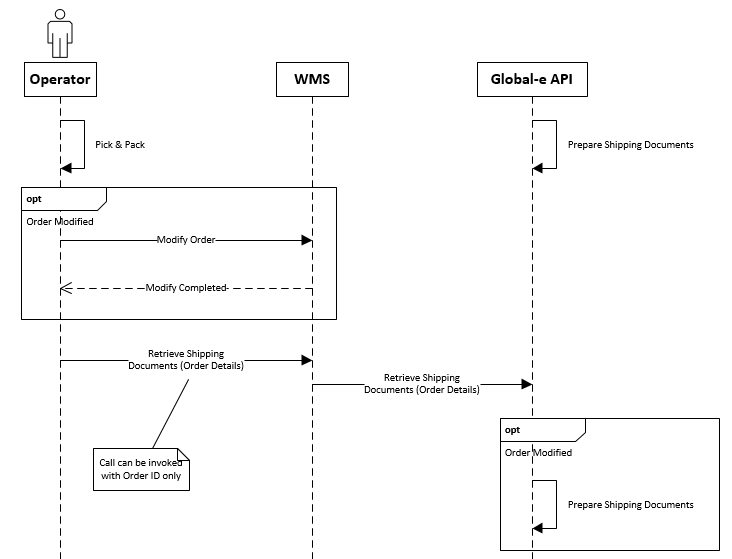
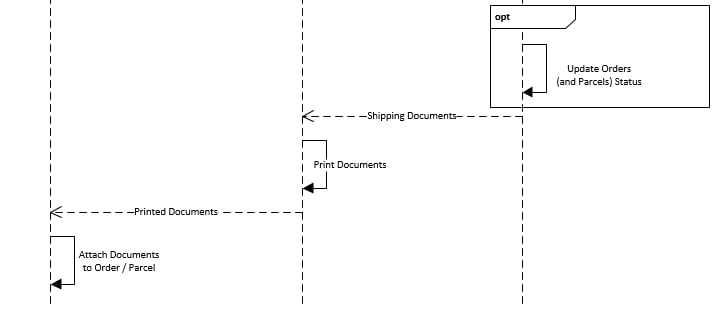
Orders Dispatch Notification
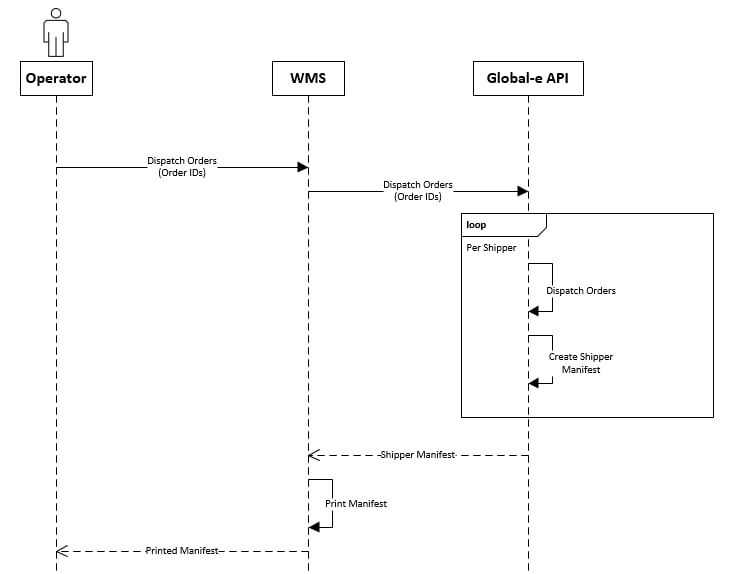
Prerequisites
The Merchant Order Management System (OMS) or Warehouse Management System (WMS) should be familiar with and support the following features, either directly or through an escalation process:- Display the complete list of items in the order
- Enable the selection of items for dispatch
Integration Steps
Identify Orders Processed via the Global‑e API
You can receive orders directly on your eCommerce platform or via 3rd party integrations. Accordingly, the following scenarios should be supported to associate orders with the Global‑e integration to generate shipping documentation:-
Shipping/Carrier code as provided in the order payload received
In Shopify’s context, such indication is available via the order
shipping_linescode or title field. Mapping of values presented in these fields should allow mapping orders to the Global‑e integration. Outside Shopify, standard carrier mapping as currently performed should be used. -
Additionally when using a direct integration with Shopify to retrieve orders, for example, Managed Markets, the merchant_of_record_app_id field will be provided. When Global‑e is responsible for an order, this value will be set to 2745565185. However, if you are an independent merchant doing this integration, you may choose either of the methods above per your integration.
The
merchant_of_record_app_idfield is available on Shopify webhooks, RESTful GET Orders calls or GraphQL queries. Version 2022-10 or later of the Shopify API is required for this field to be present.
Declare Order Fulfilment and Get Documents
GetShippingDocuments
From the orders indicated as fulfilled with possible exceptions, the Global‑e API will return the required shipping documentation as a base64 encoded byte array and URL for printing
Method/URL
| UpdateOrderDispatchRequest | Description |
|---|---|
OrderId | “eCommerce order number” as passed down in the order payload, For Shopify, should be either: Shopify Order Name (default), eg. #12345 Shopify Order Number, eg. 12345 |
DeliveryReferenceNumber (optional) | Additional informative dispatch reference |
HubCode*(optional) | When dispatching from multiple hubs, indicates for a given call which hub the related shipment will be dispatched from |
| List <Parcel> Parcels | |
| → ParcelCode (Required & MAX 20 characters) | Unique identifier for each parcel(/package) to be shippedCan be freely generated in any range as long as unique and no longer than 20 characters. |
| → List <Product> Products | ProductCode (Required)Product reference from the merchant as available in the eCommerce platform.For Shopify, should be either:Shopify SKU or Barcode for the product to be shipped |
| → → DeliveryQuantity(Required) | Quantity of a product to be shipped |
| → ShippingAdditionalInformation(Optional) | Details about additional shipping information.If a shipment contains one or multiple items with the exact same HScode, the Merchant can use this parameter to provide additional information. |
| → → name | Name of additional information item, for example ITNNumber. |
| → → value | Value of additional information item. |
| OrderDocumentsResponse | Description |
|---|---|
IsSuccess | Indicates whether the API call was successful. |
ErrorText | Description of the error for getting documents. |
| List<OrderDocument> Documents(optional) | List of OrderDocument objects that hold the shipping documents. |
→ DocumentData | Base64 encoded byte array representing the document file content. |
→ URL | URL of the document. |
→ DocumentTypeCode | Note: For PLT countries, the commercial invoice is not returned in the response. Document type code, this value can be: CommercialInvoice = 1 PackingList = 2 ShipperManifest = 3 Label = 4 VATInvoice = 5 DangerousGoodDeclarationLink = 6 GELabel = 7 CustomerReceiptInvoice = 8 ArchibeLabel = 9 DeliveryAdvice = 10 |
→ DocumentTypeName | Document type name such as AWB, CommercialInvoiceAndPackingList or Manifest |
→ DocumentExtension | Document extension (pdf, zpl, epl) |
→ ErrorMessage | Description of the error for this entity (order/parcel) if it happened. |
→ ParcelCode | The parcel code related to the document. |
| List<Merchant.ParcelTracking> ParcelsTracking(optional) | The list of Merchant.ParcelTracking objects. Each object holds the parcel tracking number and the full tracking URL of the relevant shipper (with the parcel tracking number). |
→ ParcelTrackingNumber | The tracking number used by the selected international shipping method for this parcel. |
→ ParcelTrackingUrl | Full tracking URL including ParcelTrackingNumber used by the selected international shipping method for this parcel. |
→ ParcelCode | Parcel code |
| Merchant.TrackingDetails TrackingDetails(optional) | Order tracking information. |
→ TrackingNumber | The tracking number as the shipper has specified. |
→ ShipperName | The shipping method name. |
→ TrackingURL | Full tracking URL including the TrackingNumber used by the selected international shipping method. |
| List<DeliveryAdviceInformation> DeliveryAdviceInformation(optional) | List of DeliveryAdviceInformation objects that hold the information required for the “Delivery Advice” document. |
→ ParcelCode | |
→ CommercialInvoiceNumber | Commercial invoice number of the parcel if it exists on the parcel level, otherwise order commercial invoice number. Can be null if a commercial invoice does not exist for the order. |
→ TotalValue | Value of all products in the parcel. |
→ CurrencyCode | TotalValue 3-char ISO currency code. |
UpdateOrderDispatchRequest
OrderDocumentsResponse with List<OrderDocument> Documents
-
General API error as
ErrorInfo: -
Object processing error as
OrderDocumentsResponse:
- Shipper Name (order level)
- Tracking Number (for each parcel and order level)
- Tracking URL (for each parcel and order level)
OrderDocument DocumentTypeCode list
UseDocumentTypeCode to identify the type of document returned by the API and how to print it.
Labels for Zebra/Thermal Printer
| DocumentTypeCode | Description | Paper format | Notes |
|---|---|---|---|
| 4 | Carrier Label | 6x4 | For direct dispatchDefault configuration |
| 7 | GELabel | 6x4 | ConfigurableUse for solution-specific scenarios upon request |
| 9 | ArchiveLabel | 6x4 | Only for specific |
| DocumentTypeCode | Description | Paper format | Notes |
|---|---|---|---|
| 1 | CommercialInvoice | A4 / Letter Size | Provided only for destinations not supporting electronic customs declarations |
| 5 | VATInvoice | A4 / Letter Size | legacy |
| 6 | DangerousGoods | A4 / Letter Size | Only for merchants shipping Dangerous Goods |
| 10 | Delivery Advice | A4 / Letter Size | For specific UAE Free Trade Zones requirements |
Notify Order Dispatch and Retrieve Carrier Manifest
DispatchOrders
The DispatchOrders API provides the necessary carrier manifest, encoded as a base64 byte array, and a printing URL for all orders with printed labels since the last DispatchOrders call. Non-Shopify orders are tagged as Dispatched to Customer and set up to send tracking notification emails.
Method/URL
| UpdateOrderDispatchRequest | Description |
|---|---|
HubCode*(optional) | When dispatching from multiple hubs, indicates for a given call which hub the related shipment will be dispatched from |
List <String> OrderIds | “eCommerce order number” as passed down in order payloadFor Shopify, should be either :Shopify Order Name (default), eg. #12345Shopify Order Number, eg. 12345 |
OrderDocumentsResponse
Response
| OrderDocumentsResponse | |||
|---|---|---|---|
| IsSuccess | - | Indicates whether the API call was successful | |
| ErrorText | - | Description of the error for getting documents | |
| List<OrderDocument> ShipperManifestsList of OrderDocument objects that hold shipper manifest documents.(Optional) | DocumentData | Base64 encoded byte array representing the document file content | |
URL | Url for the document | ||
DocumentTypeCode | ** For PLT countries: commercial invoice won’t be returned in the response** | Document type code, this value can be: CommercialInvoice = 1 PackingList = 2 ShipperManifest = 3 Label = 4 VATInvoice = 5 DangerousGoodDeclarationLink = 6 GELabel = 7 CustomerReceiptInvoice = 8 ArchibeLabel = 9 DeliveryAdvice = 10 | |
DocumentTypeName | Document type name, e.g. AWB, CommercialInvoiceAndPackingList or Manifest | ||
DocumentExtension | Document extension (pdf, zpl, epl) | ||
ErrorMessage | Description of the error for this entity (order/parcel) if it happened | ||
ParcelCode | The parcel code related to the document | ||
ShippingServiceName | The name of the shipping service for this document | ||
List<Merchant.ParcelTracking> ParcelsTrackingList of Merchant.ParcelTracking objects, each object holds the parcel tracking number and full tracking URL for the relevant shipper (with the parcel tracking number).(optional) | ParcelTrackingNumber | The tracking number used by the selected international shipping method for this parcel. | |
ParcelTrackingUrl | Full tracking URL including ParcelTrackingNumber used by the selected international shipping method for this parcel. | ||
ParcelCode | Parcel code | ||
| Merchant.TrackingDetails TrackingDetailsOrder tracking information.(optional) | TrackingNumber | The tracking number as the shipper has specified. | |
ShipperName | The shipping method name. | ||
TrackingURL | Full tracking URL including TrackingNumberused by the selected international shipping method. | ||
| List<DeliveryAdviceInformation> DeliveryAdviceInformation (optional)List of DeliveryAdviceInformation objects that hold the information required for the Delivery Advice document. | ParcelCode | Code used to identify the Parcel on the Merchant’s site | |
CommercialInvoiceNumber | Commercial invoice number of the parcel if it exists on the parcel level, otherwise order commercial invoice number. Can be null if a commercial invoice does not exist for the order. | ||
TotalValue | Value of all products in the parcel | ||
CurrencyCode | TotalValue3-char ISO currency code |
Mark the Order Fulfilled
Once a label has been used to ship a set of goods, update the fulfilment state back to the merchant platform to complete the workflow.- Status: Success
- Tracking Company: Use the
ShipperNamereturned by theGetShippingDocumentscall - Tracking Number: Use the
ParcelTrackingNumberreturned by theGetShippingDocumentscall - Items: Only those items that have shipped with this label should be identified
Use Cases
Examples of request body as UpdateOrderDispatchRequest Order description for this section :- product-A in quantity 1
- product-B in quantity 2
Single Parcel Shipping
Single callMulti Parcel
Single callSplit Parcels
First call (“day 1”)Country Of Origin, Parcel Weight & Dimensions
You can send the product’s country of origin, parcel weight, and parcel dimensions to DHL and Aramex via the ship request, according to the data you provided via GetShippingDocuments. If any of the following attributes are not specified, this information is taken from the default value provided in the product catalogue , as part of the ecommerce integration :- Product Country of Origin
-
Parcel Weight: For Global‑e Enterprise, the weight of the products within the parcel is calculated according to the parcel weight with the simple average method.
Example: For a parcel weighing 1000 Grams with two items, each item will weigh 500 Grams.
The weight is always in Grams in
GetShippingDocuments. -
Parcel Dimensions: For Aramex, Global-e provides the parcel dimensions according to the first parcel even for consolidated shipment (in the current implementation, the dimensions exist at the shipment level and not per parcel).
The dimensions are always in Centimetres in
GetShippingDocuments.
Error Handling
Processing Exception Scenarios
Normal Operation – No issues
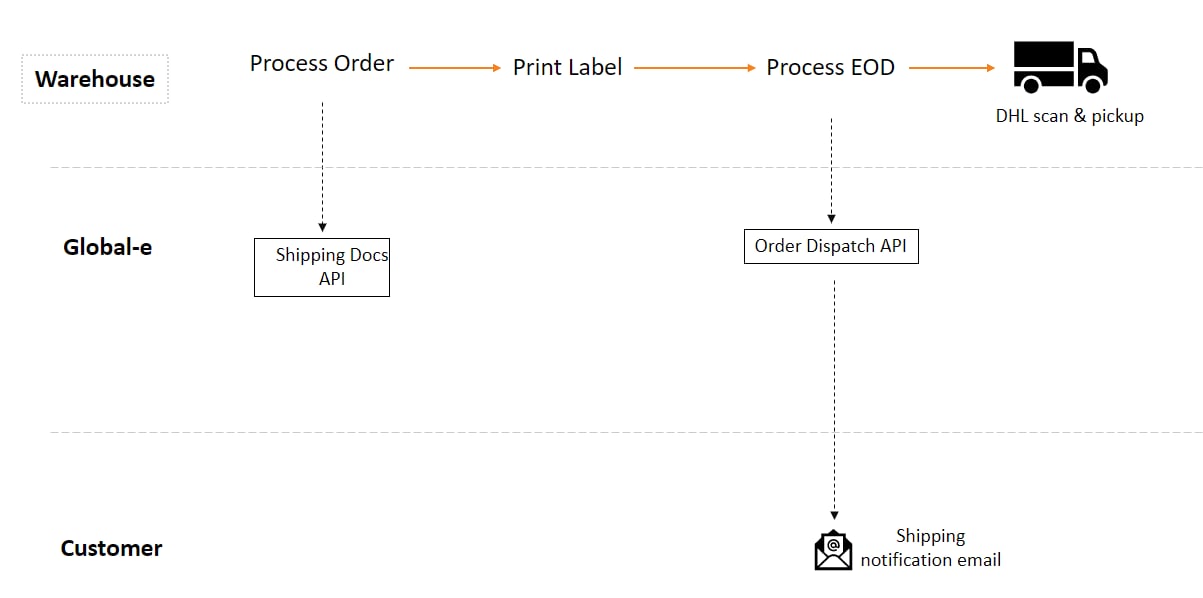
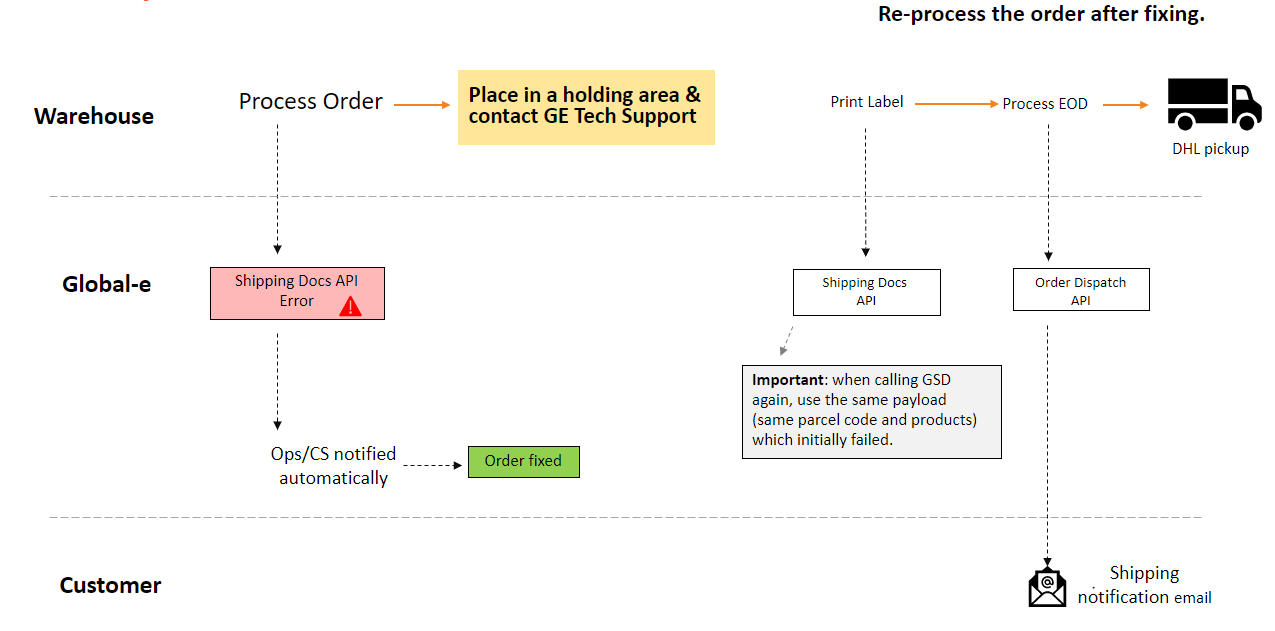
With Error Handling
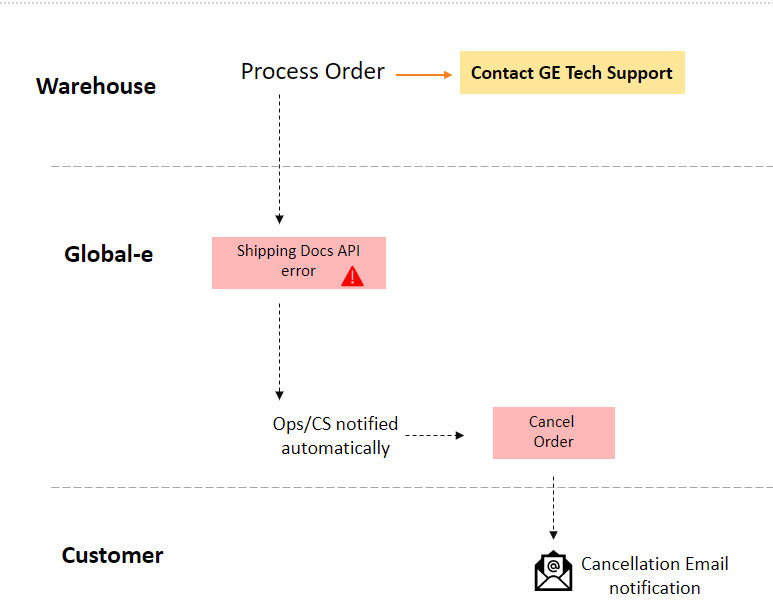
Scenario: Order to be Cancelled after a Failed API request
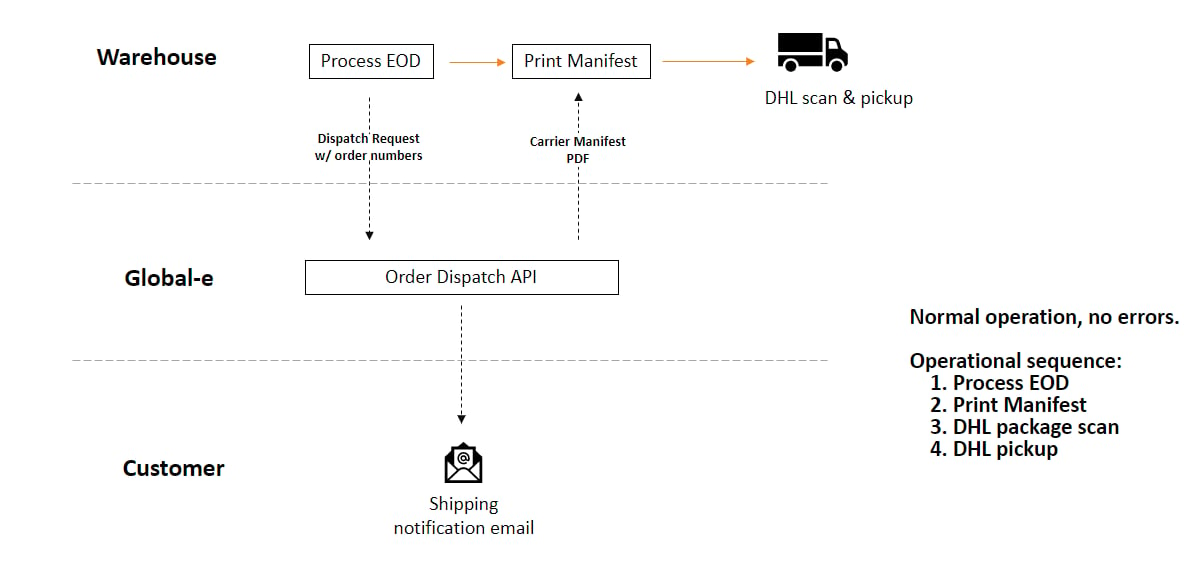
Scenario: End-of-day Manifesting
Scenario: End-of-day Manifesting with Possible Errors
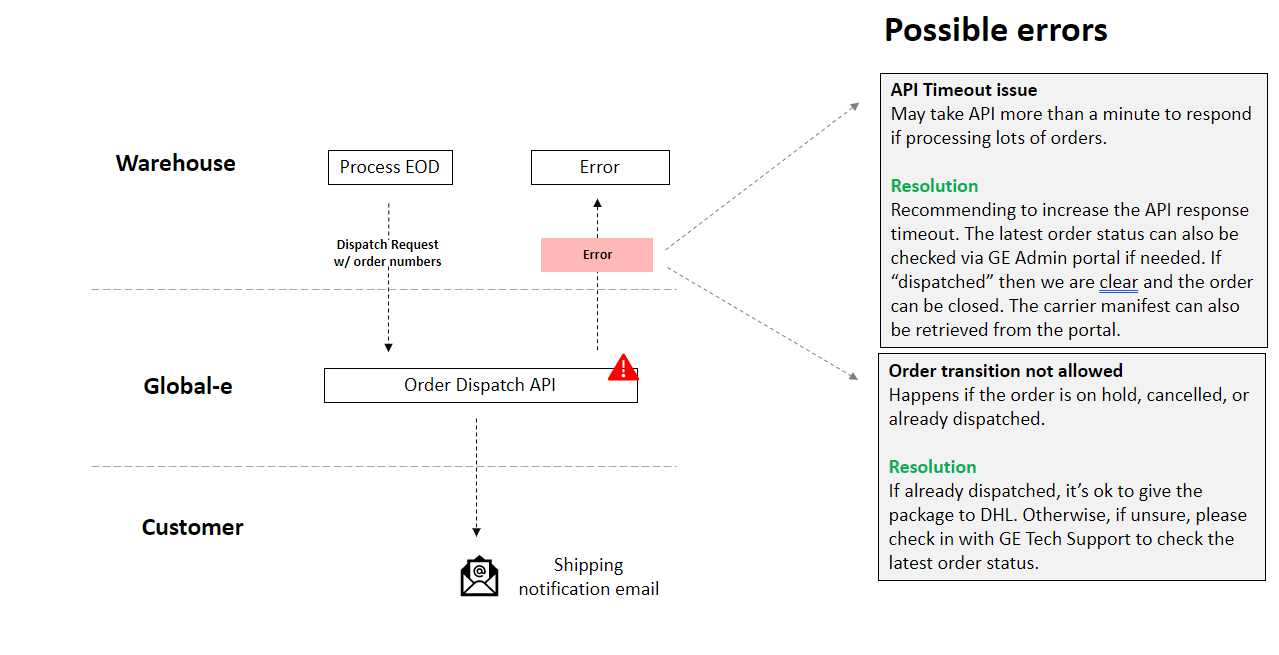
Scenario: End-of-day Manifesting with Possible Errors and Error Handling
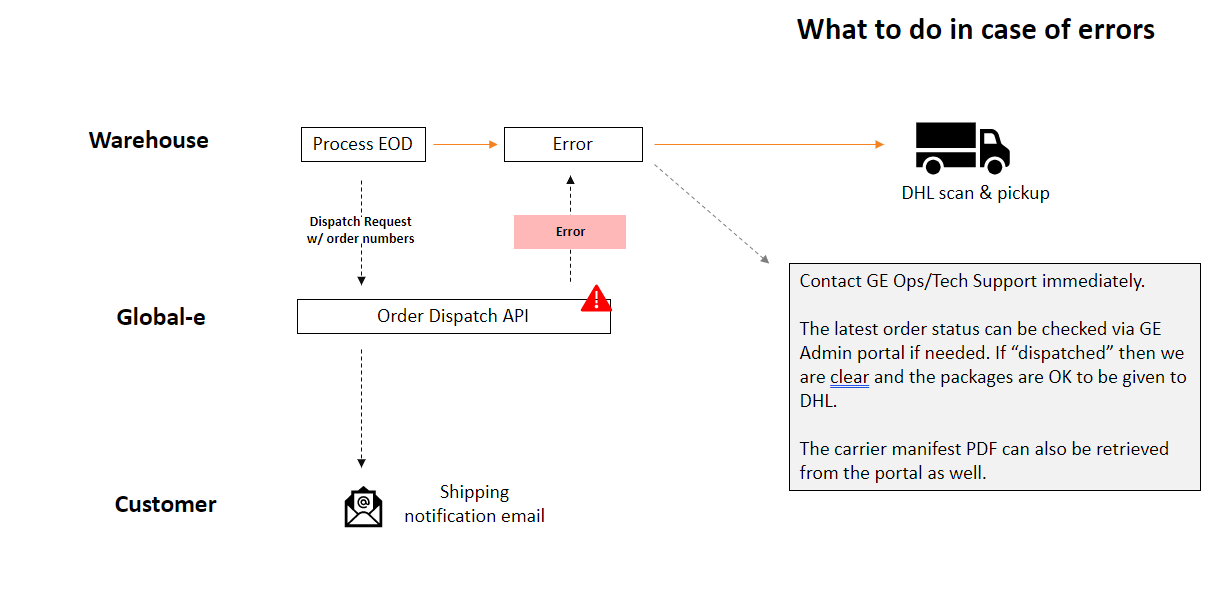
GetShippingDocuments Error Codes
| Error Code | Error Text in response | Description |
|---|---|---|
| A100 | Invalid information schema. | Relevant for technical errors. For example, wrong JSON object structure |
| A200 | Could not retrieve documents and/or process orders.Either the order has the wrong status or partial information is provided. | Relevant for logical errors. For example, the order has the wrong status |
| A300 | There is at least one SKU that was not part of the original order. Please use only SKUs which were originally ordered. | Relevant for cases in which the fulfilled SKUs contain an SKU not originally ordered (and SKU validation is turned on) |
| A400 | Either there are no valid SKUs to place in parcels or parcels could not be created. | Relevant for cases in which ALL fulfilled SKUs were not originally ordered and if we were to amend there will be no item to put in parcels (and SKU validation is turned off) |
| A500 | SMB API returns an error | There was an error generating a label via the Global-e SMB Bridge |
| A018 | Failed to generate an AWB with {shipper name} | When a ship request fails |
| A019 | The order was cancelled and cannot be shipped | When the order is in ‘Cancelled’ status |
DispatchOrders Error Codes
| Error Code | Error Text in response | Description |
|---|---|---|
| B100 | There are no orders valid for dispatch. | Relevant for dispatch requests that do not contain any valid order for dispatch |
| B200 | Could not determine the destination hub. Either none or more than one hub was found. | Relevant for consolidated shipment dispatch requests that contain orders associated with more than one hub |
| B300 | The number of outer boxes cannot be greater than the number of parcels. The total number of parcels is %Number of Parcels% and the number of outer boxes is %Number of outer boxes%. | |
| B400 | Could not create the manifest | Relevant when the hub manifest cannot be created |
| B500 | Could not create AWB | Relevant when the consolidated AWB cannot be created |
| B600 | Configuration error. Cannot determine source hub. Please contact Global‑e TechSupport | There is a configuration error on the Global-e side, more than one merchant hub is configured |
| B700 | Unknown failure | Relevant for general errors and unhandled exceptions |
| B800 | Hub Code is required | Merchant is configured to use multiple hubs per order but did not send hub code |
| B001 | Order ID not found | Refers to Order ID provided by the merchants but it does not exist |
| B002 | Order cannot be dispatched.Order and/or parcels have the wrong status. | Possible reasons : Order AWB generation has failed Order yet to be processed with GetShippingDocumentsOrder already dispatched |
| B003 | Order must be dispatched as part of a consolidated shipment | For consolidated post orders |
| B004 | Order must NOT be dispatched as part of a consolidated shipment | For NON-consolidated post orders |
Void Parcel
Introduction
The Void Parcel API lets you take out a declared parcel if you do not intend to send it or if it needs to be updated due to changed shipment requirements. **Note:**At least one order ID should be provided in the request, Global-eOrderId or the merchant’s MerchantOrderId.
Integration Overview
Method/URL- string
OrderId(mandatory) - Order unique identifier - string
ParcelCode(mandatory) - Code used to identify theParcelCodeto void. - string
MerchantOrderId- The merchant’s order unique identifier.
Example
Request:Error Handling
| Error Code | Error Text | Additional Information |
|---|---|---|
| C100 | The parcel cannot be voided due to the status of the parcel.For a Global‑e operated hub, only the following statuses can be voided:Failed Transfer To ShippingShipped By Merchant | This is the error in case the hub is operated by Global-e and the parcel has the wrong status. |
| C101 | The parcel cannot be voided due to the status of the parcel. For merchant-operated hubs, only the following statuses can be voided:Failed Transfer To ShippingShipped By MerchantReceived In Hub | This is the error in case the hub is operated by the Merchant and the parcel has the wrong status. |
| C102 (Log) | The parcel was voided, but the shipper’s API to cancel the shipment failed.The following information is available from the shipper.Error code: <shipper error code>Error text: <error text> | The API success (IsSuccess=True).Add it to the log and to the relevant field in the response |
| C103 | Internal unknown failure | - |
| C104 | The parcel code was not found, or the parcel was already voided | - |