

Address Field Validations
Validating the Checkout Page Address Fields
The address information submitted on the Checkout Page is important to ensure the order is shipped to the right destination. Validations are also performed on the field level.Address Field Formats and Error Handling
The address form contains address fields with the following formats and error notifications.| Field | Format | Error notifications |
|---|---|---|
| Address Line1 | Maximum length is 35 characters. If the shipping method is one of the following:ExpressExpressCourierWithoutSameDayStandardA PO Box won’t be accepted as an address without a delivery address. When unsupported characters are identified, the field is marked and a notification is displayed. Allows letters, numbers, and specific special characters. Additional format validation may be configured per country. | When the 36th character is attempted a notification is displayed:You’ve reached the maximum limit for Address Line 1 field. Please use Address Line 2 if you need more space”image6.pngThe following notification displays:Title: PO box address is not allowed on this shipping methodContent: Dear Customer, The courier service you have selected requires a signature upon delivery. We are therefore unable to accept orders to a PO box address. To continue, please provide an alternative shipping address |
| Address Line 2 | Maximum length is 35 characters.**Additional characters are not accepted. If the shipping method is one of the following:ExpressExpressCourierWithoutSameDayStandardA PO Box won’t be accepted as an address without a delivery address. When Unsupported characters are identified the field is marked and notification displays. Allows letters, numbers, and specific special characters. Additional format validation may be configured per country. | The following notification displays when a PO Box is added as an address to the shipping methods mentioned:Title: PO box address is not allowed on this shipping method Content:Dear Customer, The courier service you have selected requires a signature upon delivery. We are therefore unable to accept orders to a PO box address. To continue, please provide an alternative shipping address |
| City/Suburb | Maximum length is 35 characters. Offers dropdown suggestions and dynamic city-region pairing for select countries. Allows letters and hyphens.When unsupported characters are identified, the field is marked and a notification is displayed. Additional format validation may be configured per country. | When unsupported characters are identified, the field is marked in red and the checkout can not be completed until it is fixed. |
| Country | Changing the default country requires that the customer fills out a delivery address that is different from the billing address.Country-specific address formatting and restricted country lists for some merchants. | |
| County/Province/State | A dropdown menu for some regions that includes counties, states, or provinces.For more details please see the Counties, States, and Provinces section. | |
| For registered users, pre-filled and locked if email already provided. The following information defines what a valid email address is, based on: https://en.wikipedia.org/wiki/Email_address Valid email addresses must comply with the following: Uppercase and lowercase Latin letters (A–Z,**a–z) (ASCII: 65–90, 97–122)**Digits 0 to 9 (ASCII: 48–57) *These special characters:**# - _ ~ ! $ & ’ + | {} = “ / @**Character. (dot, period, full stop), ASCII 46, provided that it is not the first or last character, and provided that it does not appear consecutively (e.g. John..Doe@example.com is not allowed).*Special Characters for non-English languages (accents). | When an incorrect character is submitted, the field is marked in red, and an “X” is displayed on the right side.image4.pngOn mouseover, an “Email not Valid” tooltip is displayedimage5.png | |
| First Name | Maximum length is 40 Characters Cannot contain special characters or numbers. When unsupported characters are identified, the field is marked, and a notification is displayed. For more information about Special Characters, please see the Supported Characters section. | When unsupported characters are identified the field is marked in red and the checkout can not be completed until it is fixed. |
| Last Name | Maximum length is 40 Characters Cannot contain special characters or numbers. When unsupported characters are identified, the field is marked and a notification is displayed. For more information about Special Characters, please see the Supported Characters section. | When unsupported characters are identified the field is marked in red and the checkout can not be completed until it is fixed. |
| Phone | Following characters are allowed: Numbers, “+”, “-“, “/”, “(“ and “)” Maximum length is 15 characters When unsupported characters are identified, the field is marked and a notification is displayed. Drop-down menu of country prefixes can be enabled for applicable countries. Additional format validation may be configured per country. For more details please see the Phone Field Validations per Country sectionPhone Field Validations per Country | |
| Zip/Postcode | Maximum length is 10 Characters When unsupported characters are identified, the field is marked and a notification is displayed. There is a configuration per country whether this field is mandatory or not Additional format validation may be configured per country. For more details please see the Zip/Postcode Field Validations per Country section | When no input is available, a mouseover displays a tooltip:“Billing Zip/Postcode is required”image7.pngWhen unsupported characters are identified the field is marked in red and the checkout can not be completed until it is fixed. |
Phone Validation Flow in Checkout
Why We Introduced This Change
Shoppers often enter phone numbers in inconsistent ways—missing country codes, typing leading zeros, or using invalid formats. This leads to:- Failed deliveries or shipping delays.
- Checkout errors that block order completion.
What’s New for Merchants
- Structured validation: Phone numbers are automatically checked and formatted to international E.164 standards on the server side.
- Real-time feedback: Shoppers still receive clear guidance while typing, but validation that previously failed on the client side now succeeds after being corrected on the backend.
- Data accuracy: Stored numbers are always valid, deliverable, and standardized.
- Configuration: You can enable validation globally or per-country.
Shopper Experience in Checkout
Before (old flow): Shopper types 09876543211 → checkout rejects the number immediately on the client side. Now (new flow):- Shopper types 09876543211 (UK) → shopper sees no blocking error; system auto-removes the leading zero on the server side and saves as +449876543211.
-
Shopper types invalid characters (98765abc321) → shopper receives a clear error message with guidance to fix the input.

Configuration and Enablement
This feature applies only if you use the dropdown phone field in checkout. If you’d like to enable this feature, contact your Global-e representative.| Setting | Behavior |
|---|---|
| IsPhoneNumbersNewFlow = false | Current validation logic remains. |
| IsPhoneNumbersNewFlow = true | New validation applies to all countries. |
| IsPhoneNumbersNewFlow = per-country | New validation applies only in selected markets. |
| UseCustomPhoneNumberValidation = true | Merchant-specific rules override global validation. |
Examples of Allowed Inputs
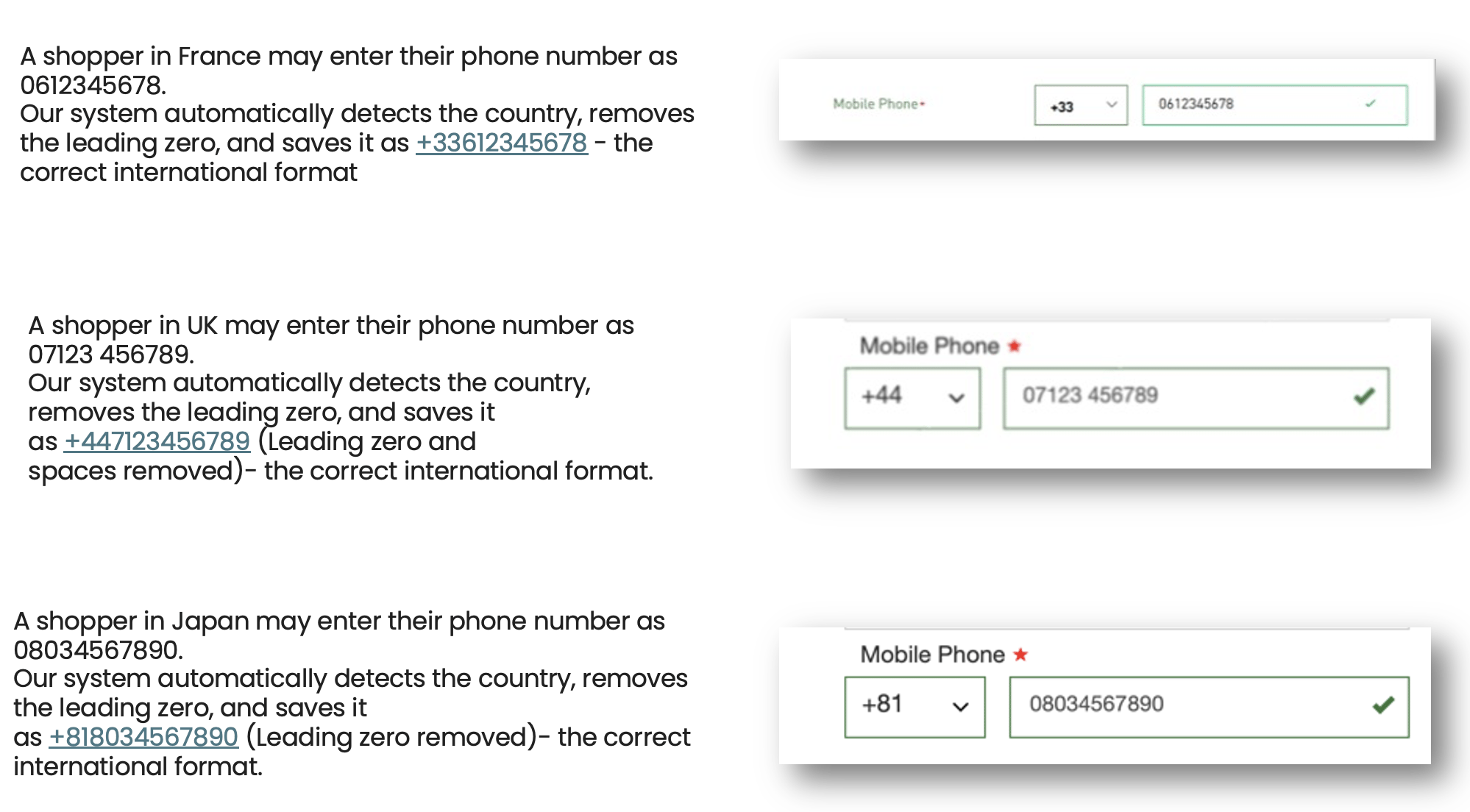
The following table shows examples of allowed inputs:| Shopper Input | Selected Country | Saved Output | Accepted? |
|---|---|---|---|
| 9876543211 | USA | +19876543211 | Yes |
| 02081234567 | UK | +442081234567 | Yes |
| 20812 34567 | UK | +442081234567 | Yes |
| 08034567890 | Japan | +818034567890 | Yes |
Shopper Error Messages
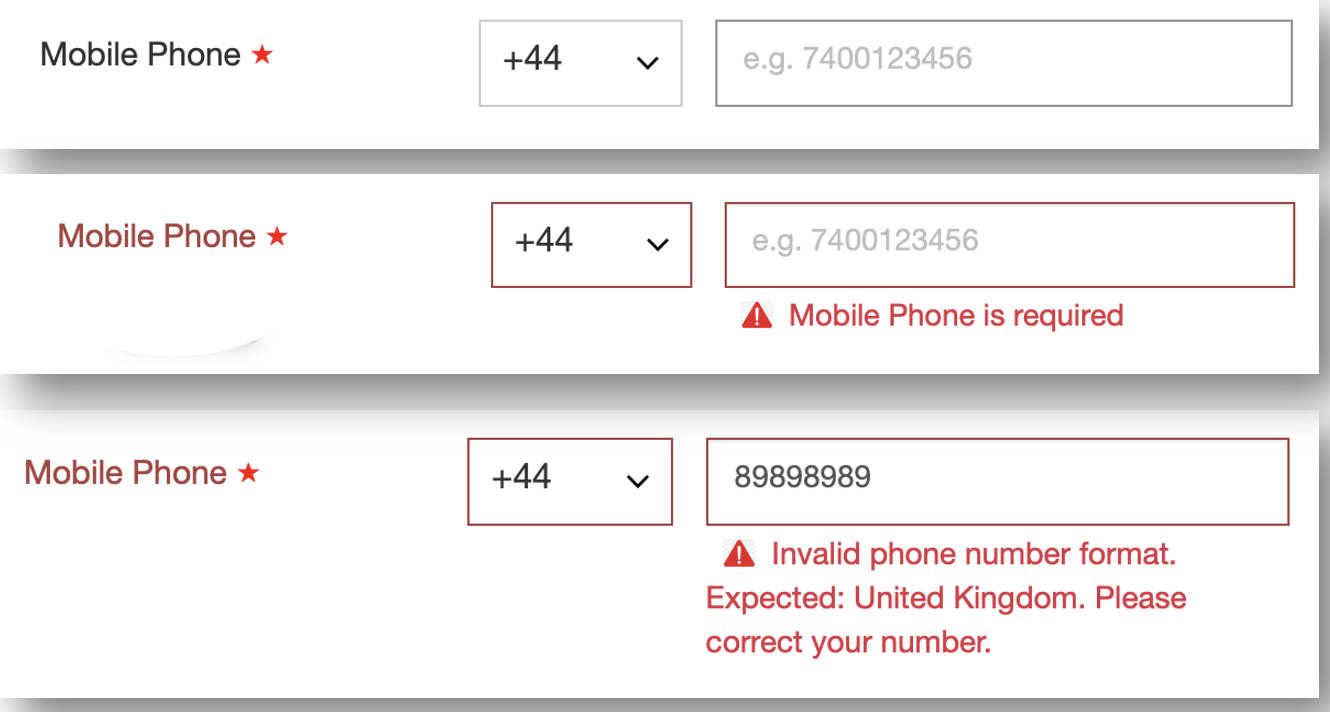
If a shopper enters an invalid number, the following error message is displayed. “Invalid phone number format. Expected phone country: {Country Name}. Please adjust your number accordingly.”Benefits for Merchants
- 📦 Fewer failed shipments due to invalid numbers.
- 💬 Clear shopper guidance reduces support tickets.
- 📊 Clean, standardized phone data across your orders.
- 🚀 Proven impact on conversion rates by removing friction.
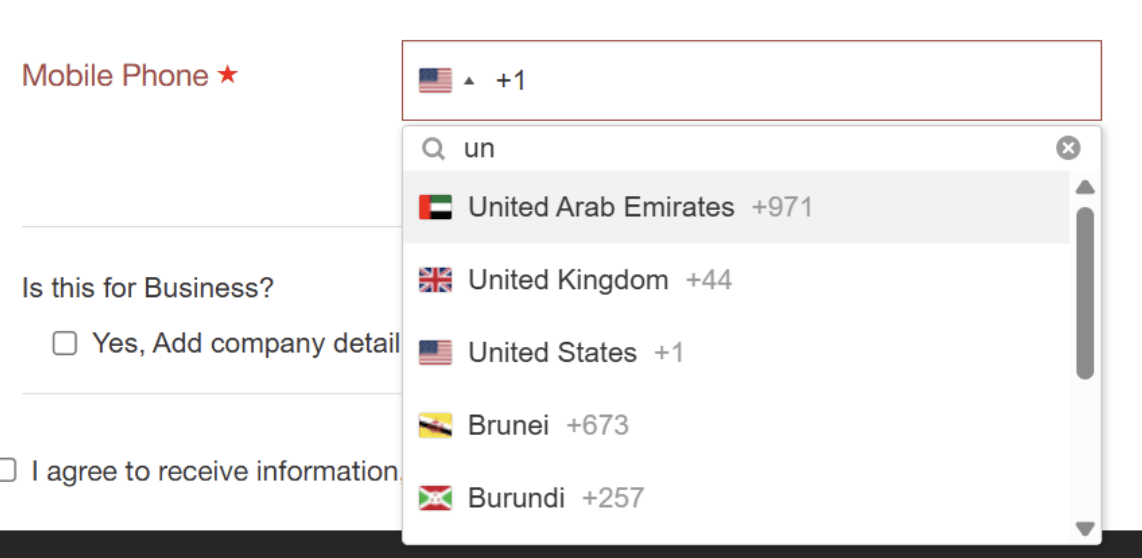
- Easy country search by name or code.
-
Restricts input to digits only for cleaner validation.
Zip/Postcode Field Validations per Country
In addition to the general field validations, a zip field format validation is configured for specific countries. Specific validations can be set per Merchant.| Country | Field | Validation | Additional Info |
|---|---|---|---|
| Albania | Post Code | 4 digits | |
| Algeria | Post Code | 5 digits | |
| Andorra | Post Code | 2 Capital letters and 3 digits (AB123) | |
| Angola | Post Code | Field Optional | |
| Antigua and Barbuda | Post Code | Field Optional | |
| Argentina | Post Code | 4 digits | |
| Armenia | Post Code | 4 digits | |
| Aruba | Post Code | Field Optional | |
| Austria | Post Code | 4 digits | |
| Australia | Post Code | 4 digits | |
| Azerbaijan | Post Code | 4 digits | |
| Bahamas | Post Code | Field Optional | |
| Bahrain | Post Code | Field Disabled. Sending “00000” | |
| Belarus | Post Code | 6 digits | |
| Belize | Post Code | Field Optional | |
| Belgium | Post Code | 4 digits | |
| Benin | Post Code | Field Optional | |
| Bolivia | Post Code | Field Optional | |
| Bonaire, Saint Eustatius and Saba | Post Code | Field Optional | |
| Botswana | Post Code | Field Optional | |
| Bouvet Island | Post Code | Field Optional | |
| Bulgaria | Post Code | 4 digits | |
| Burkina Faso | Post Code | Field Optional | |
| Burundi | Post Code | Field Optional | |
| Central African Republic | Post Code | Field Optional | |
| Cambodia | Post Code | 6 digits | |
| Cameroon | Post Code | Field Optional | |
| Canada | Post Code | 5 or 6 digits | In one of the following formats: A1A 1A1 or A1A 1A |
| Chad | Post Code | Field Optional | |
| Chile | Post Code | 7 digits | |
| China | Post Code | 6 digits | |
| Colombia | Post Code | 6 digits | |
| Comoros | Post Code | Field Optional | |
| Congo | Post Code | Field Optional | |
| Congo, Democratic Republic | Post Code | Field Required | |
| Cook Islands | Post Code | Field Optional | |
| Costa Rica | Post Code | 5 digits | |
| Cote D’Ivoire (Ivory Coast) | Post Code | Field Optional | |
| Croatia | Post Code | 5 digits | |
| Curacao | Post Code | Field Optional | |
| Cyprus | Postal Code | 4 digits | |
| Czech Republic | Post Code | 5 digits | |
| Denmark | Post Code | 4 digits | |
| Djibouti | Post Code | Field Optional | |
| Dominica | Post Code | Field Optional | |
| East Timor | Post Code | Field Optional | |
| Ecuador | Post Code | 6 digits | |
| Egypt | Post Code | 5 digits | |
| Equatorial Guinea | Post Code | Field Optional | |
| Eritrea | Post Code | Field Optional | |
| Estonia | Post Code | 5 digits | |
| Fiji | Post Code | Field Optional | |
| Finland | Post Code | 5 digits | |
| France | Post Code | 5 digits | |
| French Southern Territories | Post Code | Field Optional | |
| Gabon | Post Code | Field Optional | |
| Gambia | Post Code | Field Optional | |
| Germany | Post Code | 5 digits | |
| Ghana | Post Code | Field Required | |
| Greece | Post Code | 5 digits | In the format XXX XX or XXXXX |
| Grenada | Post Code | Field Optional | |
| Guatemala | Post Code | 5 digits | |
| Guinea | Post Code | Field Required | |
| Guyana | Post Code | Field Optional | |
| Hong Kong | Post Code | Field Disabled | |
| Hungary | Post Code | 4 digits | |
| Iceland | Post Code | 3 digits | |
| India | Post Code | 6 digits | |
| Indonesia | Post Code | 5, 6 digits | |
| Ireland | Post Code | 7 digits or 7 characters (Eircode) | |
| Israel | Post Code | 7 digits | |
| Italy | Post Code | 5 digits | |
| Jamaica | Post Code | Field Optional | |
| Japan | Post Code | 7 digits (XXXXXXX or (XXX-XXXX) | |
| Kazakhstan | Post Code | 6 digits | |
| Kiribati | Post Code | Field Optional | |
| Korea (North) | Post Code | Field Optional | |
| Kuwait | Post Code | 5 digits | |
| Liberia | Post Code | Field Optional | |
| Libya | Post Code | Field Optional | |
| Luxembourg | Post Code | 4 digits | |
| Macau | Post Code | Field Disabled. Sending “999087” | |
| Malawi | Post Code | Field Optional | |
| Malaysia | Post Code | 5 digits | Field Optional |
| Mali | Post Code | Field Optional | |
| Mauritania | Post Code | Field Optional | |
| Mauritius | Post Code | Field Required | |
| Mexico | Post Code | 5 digits | |
| Moldova | Post Code | 4 digits | |
| Monaco | Post Code | Field Disabled. Sending “98000” | |
| Mongolia | Post Code | 5 digits | |
| Montenegro | Post Code | 5 digits | |
| Montserrat | Post Code | Field Required | |
| Morrocco | Post Code | 5 digits | |
| Namibia | Post Code | Field Required | |
| Nauru | Post Code | Field Required | |
| Nigeria | Post Code | 6 digits | |
| New Zealand | Post Code | 4 digits | |
| Netherlands | Post Code | 4 digits and 2 letters (1235 AB) | |
| Netherlands Antilles | Post Code | Field Optional | |
| Niue | Post Code | Field Required | |
| Northern Macedonia | Post Code | 4 digits | |
| Norway | Post Code | 4 digits | |
| Oman | Post Code | 3 digits | |
| Panama | Post Code | Field Required | |
| Philippines | Postal Code | 4 digits | |
| Poland | Post Code | 5 digits (XX-XXX) | |
| Portugal | Post Code | 7 digits (XXX-XXXX) | |
| Qatar | Post Code | Field Disabled. Sending “00000” | |
| Reunion | Post Code | 5 digits | |
| Romania | Post Code | 6 digits | |
| Russia | Post Code | 6 digits | |
| Rwanda | Post Code | Field Required | |
| Saint Kitts and Nevis | Post Code | Field Required | |
| Saint Lucia | Post Code | Field Required | |
| Sao Tome and Principe | Post Code | Field Optional | |
| Saudi Arabia | Post Code | Field Disabled. Sending “00000” | |
| Senegal | Post Code | 5 digits | |
| Serbia | Post Code | 5 digits | |
| Seychelles | Post Code | Field Optional | |
| Sierra Leone | Post Code | Field Optional | |
| Singapore | Post Code | 6 digits | |
| Sint Maarten | Post Code | Field Optional | |
| Slovenia | Post Code | 4 digits | |
| Solomon Islands | Post Code | Field Optional | |
| Somalia | Post Code | Field Optional | |
| South Africa | Post Code | 4 digits | |
| South Korea | Post Code | 5 digits no dash | |
| South Cudan | Post Code | Field Optional | |
| Spain | Post Code | 5 digits | |
| Sri Lanka | Post Code | 4 digits | |
| Suriname | Post Code | Field Optional | |
| Syria | Post Code | Field Optional | |
| Sweden | Post Code | 5 digits | |
| Tanzania | Post Code | Field Required | |
| Thailand | Post Code | 5 digit | |
| Togo | Post Code | Field Optional | |
| Tokelau | Post Code | Field Optional | |
| Tonga | Post Code | Field Optional | |
| Trinidad and Tobago | Post Code | Field Optional | |
| Tunisia | Post Code | 4, 5 digits | |
| Turkey | Post Code | 5 digits | |
| Tuvalu | Post Code | Field Optional | |
| Uganda | Post Code | Field Required | |
| Ukraine | Post Code | 5 digits | |
| United Arab Emirates | Post Code | Field Disabled. Sending “00000” | |
| United Kingdom | Post Code | Length is 5 to 8 characters.Format begins with 1-2 uppercase letters followed by 1-2 digits, optionally a single letter, a space (optional), then ends with 1 digit and 2 uppercase letters.Supports valid formats like SW1A 1AA, W1A 0AX, etc | |
| United States | Post Code | 5 or 9 (XXXXX-XXXX) digits | In the format XXXXX or XXXXX-XXXX |
| United States Minor Outlying Islands | Post Code | Field Optional | |
| Uzbekistan | Post Code | 6 digits (XXX XXX or XXXXXX) | In the format XXXXXX or XXX XXX |
| Vanuatu | Post Code | Field Optional | |
| Venezuela | Post Code | 4 digits | |
| Yemen | Post Code | Field Optional | |
| Zimbabwe | Post Code | Field Optional |