> ## Documentation Index
> Fetch the complete documentation index at: https://nce-docs.bglobale.com/llms.txt
> Use this file to discover all available pages before exploring further.
# Tracking an Order
**To track an order:**
1. Access the Tracking Portal:
From the [Tech Support Help Center](https://service.global-e.com/), click **Where is My Order**?
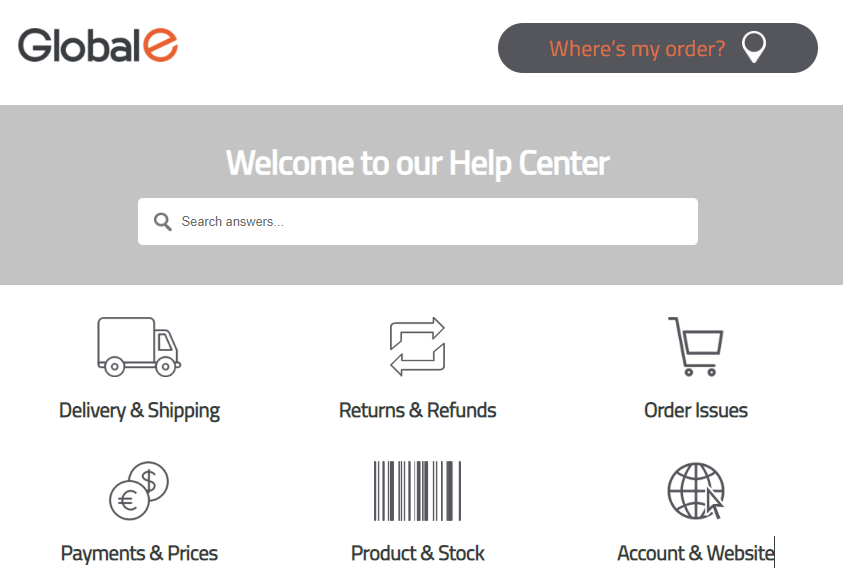 Alternatively, you can access the Tracking Portal directly: [https://service.global-e.com/track-my-order](https://service.global-e.com/track-my-order)
The Tracking Portal opens showing the Track Orders view.
Alternatively, you can access the Tracking Portal directly: [https://service.global-e.com/track-my-order](https://service.global-e.com/track-my-order)
The Tracking Portal opens showing the Track Orders view.
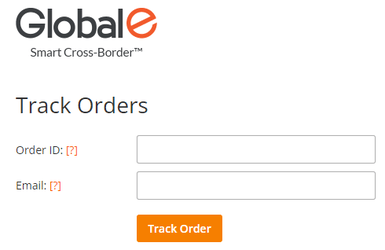 2. Enter your *Global‑e Order ID* or Merchant Order ID.
3. Enter the *email* address used to place the order.
4. Click **Track Order**.
The order opens, showing the order details and status, and the Order ID as you entered it.
2. Enter your *Global‑e Order ID* or Merchant Order ID.
3. Enter the *email* address used to place the order.
4. Click **Track Order**.
The order opens, showing the order details and status, and the Order ID as you entered it.
 Note for the Merchant: You can request that Global‑e adds the following product parameters for
`TrackingPortalProductAttributesFormat`
Default: `%Product Image% %Product Name% %Product Description%`
Supported parameters:
* `{ProductName}`
* `{ProductDescription}`
* `{DutyCategoryName}`
* `{ProductCode}`
* `{ProductMetaData}`
* `{ProductGroupCode}`
* `{FirstProductCategory}`
* `{LastProductCategory}`
5. Optional: If required. click **Track Another Order**.
You are redirected to the Track Orders view. The Order ID and email address are cleared.
* **Marketplace Order** - If the order has an associated marketplace order ID, then the order identifier can accept the marketplace order ID.
* **Mixed Order** - Once searching for a sub-order, all the Mixed Order associated parcels will be displayed with an appropriate tracking status. Searchable by Merchant Order ID / Global-e Order ID.
## Error Messages
An error message is displayed in the following cases.
| Error | Description |
| ----------------------------------------------------- | -------------------------------------------------------------------------------------------------------------------------- |
| Sorry, we couldn’t find that order id in our database | There is no order that matches the provided order ID and email. Make sure to enter the correct order ID and email address. |
| There are multiple orders with these details | We found several orders for this merchant (or marketplace) order ID and email combination. |
| Enter a valid mail address | Make sure to enter the email address used to place the order. |
Note for the Merchant: You can request that Global‑e adds the following product parameters for
`TrackingPortalProductAttributesFormat`
Default: `%Product Image% %Product Name% %Product Description%`
Supported parameters:
* `{ProductName}`
* `{ProductDescription}`
* `{DutyCategoryName}`
* `{ProductCode}`
* `{ProductMetaData}`
* `{ProductGroupCode}`
* `{FirstProductCategory}`
* `{LastProductCategory}`
5. Optional: If required. click **Track Another Order**.
You are redirected to the Track Orders view. The Order ID and email address are cleared.
* **Marketplace Order** - If the order has an associated marketplace order ID, then the order identifier can accept the marketplace order ID.
* **Mixed Order** - Once searching for a sub-order, all the Mixed Order associated parcels will be displayed with an appropriate tracking status. Searchable by Merchant Order ID / Global-e Order ID.
## Error Messages
An error message is displayed in the following cases.
| Error | Description |
| ----------------------------------------------------- | -------------------------------------------------------------------------------------------------------------------------- |
| Sorry, we couldn’t find that order id in our database | There is no order that matches the provided order ID and email. Make sure to enter the correct order ID and email address. |
| There are multiple orders with these details | We found several orders for this merchant (or marketplace) order ID and email combination. |
| Enter a valid mail address | Make sure to enter the email address used to place the order. |