> ## Documentation Index
> Fetch the complete documentation index at: https://nce-docs.bglobale.com/llms.txt
> Use this file to discover all available pages before exploring further.
# Accessing the Process Orders Screen
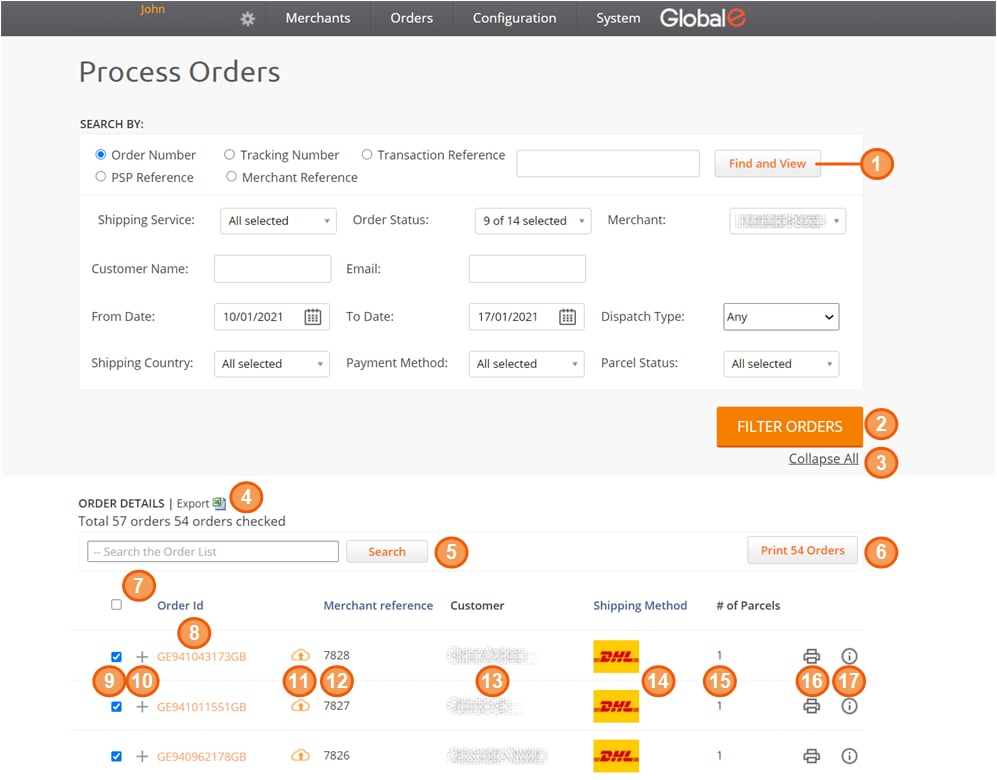
The Process Order screen is the core of the fulfilment process.
**To access the Process Orders screen:**
* In the Global‑e Merchant Portal, navigate to **Orders → Merchant Hub → Process Orders**
The Process Orders screen opens, showing by default the list of orders that are ready for processing according to date range settings; each order is also selected by default. Make sure to scroll down the list to view all orders.